That’s exactly what an Advertising Exchange can do for you. It’s a smart strategy that lets you grow your audience faster by trading ad spots instead of relying solely on paid ads. You’ll discover how the Advertising Exchange works and how you can use tools like The Click Engine to maximize your marketing efforts.
Ready to unlock a powerful method to skyrocket your visibility? Keep reading—you don’t want to miss this.
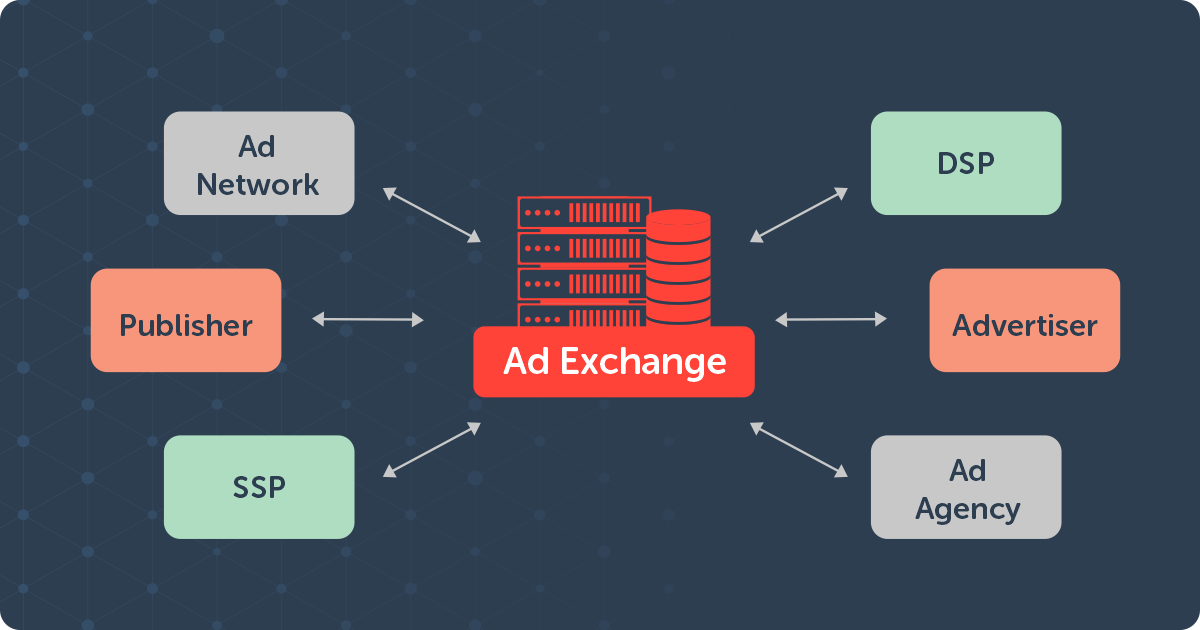
Credit: adsparc.com
Introduction To Advertising Exchange And Its Purpose
Advertising exchanges are digital platforms that connect buyers and sellers of online ad space. They help make the buying and selling process faster and more efficient. These exchanges bring transparency and automation to digital advertising. Their main goal is to match advertisers with the best available ad spots in real time.
This system helps businesses reach their target audience at the right time and place. It also allows publishers to maximize the value of their ad inventory. Advertising exchanges play a key role in modern online marketing by simplifying how ads are bought and sold.
What Is An Advertising Exchange?
An advertising exchange is a marketplace for digital ads. It operates like a stock exchange but for ad space. Advertisers bid on available spots, and the highest bid wins. The process happens in milliseconds during a web page load.
-
Buyers: Advertisers seeking to display ads.
-
Sellers: Publishers offering space on their websites.
-
Real-time bidding (RTB): Automated auction process.
This automated system improves efficiency and pricing transparency in advertising. It replaces traditional direct sales with a more dynamic and competitive market.
How Advertising Exchanges Revolutionize Digital Advertising
Advertising exchanges changed how ads are bought and sold online. They introduced real-time bidding, which allows instant auctions for ad spaces. This innovation leads to better targeting and optimized ad spending.
-
Faster transactions: Ads are bought and sold instantly.
-
Better targeting: Ads reach the right users based on data.
-
Increased transparency: Advertisers see where their ads appear.
-
Cost efficiency: Advertisers pay fair market prices.
These benefits help advertisers improve campaign results. Publishers gain more revenue by selling inventory at competitive prices.
Why Businesses Should Consider Advertising Exchanges
Businesses can benefit greatly from using advertising exchanges. They offer access to a wide range of ad inventory across many websites. This increases ad reach without extra effort.
Key advantages include:
|
Advantage |
Benefit |
|
|---|---|---|
|
Wide audience access |
Reach millions of users across diverse platforms |
|
|
Cost control |
Set budgets and bids to manage expenses |
|
|
Improved targeting |
Use data to focus on specific demographics |
|
|
Performance tracking |
Monitor ad success with detailed reports |
Advertising exchanges simplify campaign management. They help businesses get better results with less effort.

Credit: en.wikipedia.org
Key Features That Make Advertising Exchanges Unique
Advertising exchanges offer a powerful way to buy and sell ad space efficiently. They connect advertisers and publishers on a large scale. This connection happens through automated platforms that help both parties achieve their goals. The uniqueness lies in the advanced technology and features they provide. These features improve targeting, control, and return on investment (ROI).
Real-time Bidding For Maximized Roi
Real-Time Bidding (RTB) allows advertisers to bid on ad impressions instantly. Each impression is auctioned in milliseconds before the page loads. This process ensures advertisers pay only for the most relevant views.
-
Maximizes ROI by targeting the right audience at the right time.
-
Reduces wasted ad spend by focusing on valuable impressions.
-
Allows dynamic pricing based on demand and audience quality.
Wide Network Access To Diverse Publishers And Advertisers
Advertising exchanges provide access to a vast network of publishers and advertisers. This network includes websites, apps, and platforms from various industries and regions.
|
Benefit |
Description |
|
|---|---|---|
|
Publisher Variety |
Access to many publishers offering different ad spaces and audiences. |
|
|
Advertiser Reach |
Advertisers can reach diverse audiences across multiple channels. |
|
|
Scalability |
Easy to scale campaigns across many sites and formats. |
Advanced Targeting And Audience Segmentation
Advertising exchanges use data to help advertisers target precise audiences. This targeting increases ad relevance and performance.
-
Segment audiences by demographics, interests, and behaviors.
-
Use location and device data to refine targeting.
-
Improve campaign efficiency by focusing on high-value users.
Transparency And Control Over Ad Placements
Advertisers get clear insights into where ads appear. They can control the quality and context of their ad placements.
-
View detailed reports on ad performance and placement.
-
Block unwanted sites to protect brand safety.
-
Adjust bids and targeting based on real-time data.
Integration With Multiple Advertising Platforms
Advertising exchanges easily connect with various platforms and tools. This integration streamlines campaign management.
-
Supports integration with demand-side platforms (DSPs).
-
Works with supply-side platforms (SSPs) for publisher access.
-
Enables seamless data sharing and optimization across systems.
Pricing And Affordability Breakdown
Advertising exchanges offer a variety of pricing models to suit different marketing goals and budgets. Understanding these models helps businesses spend wisely and get the best results. This section explains key cost structures and shows how advertising exchanges can optimize your budget compared to traditional advertising methods.
Understanding Cost Structures: Cpc, Cpm, And Cpa Models
Advertising exchanges use three main pricing models:
-
CPC (Cost Per Click): Pay only when someone clicks your ad. Ideal for driving traffic.
-
CPM (Cost Per Mille): Pay per 1,000 ad impressions. Good for brand awareness campaigns.
-
CPA (Cost Per Action): Pay when a specific action happens, like a sale or signup. Focuses on conversions.
Each model suits different marketing needs. Choosing the right one controls costs and improves ROI.
How Advertising Exchanges Optimize Budget Allocation
Advertising exchanges use real-time bidding and data to place ads efficiently.
-
They target the right audience at the right time.
-
They adjust bids based on ad performance.
-
They reduce wasted spend by avoiding low-value placements.
This smart allocation ensures your budget delivers maximum impact without overspending.
Comparing Advertising Exchange Costs To Traditional Advertising
|
Cost Aspect |
Advertising Exchange |
Traditional Advertising |
|---|---|---|
|
Pricing Model |
Flexible (CPC, CPM, CPA) |
Fixed rates (TV, print, radio) |
|
Budget Control |
High; adjustable bids and targeting |
Low; fixed slots and packages |
|
Audience Targeting |
Precise and data-driven |
Broad and less measurable |
|
Cost Efficiency |
Pay for actual results |
Pay upfront regardless of impact |
Flexible Pricing Options For Different Business Sizes
Advertising exchanges suit all business sizes. Pricing adapts to your budget and goals.
-
Small businesses: Start with low CPC or CPM bids to test ads.
-
Medium businesses: Use CPA models to focus on sales and leads.
-
Large businesses: Invest in multiple models and large-scale campaigns.
Tools like The Click Engine help manage these options easily.
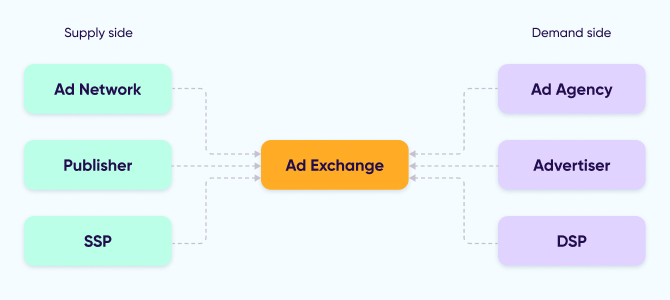
Credit: www.appsflyer.com
Pros And Cons Based On Real-world Usage
Advertising exchanges offer a dynamic platform for buying and selling ad space programmatically. Users often find a mix of advantages and challenges when working with these systems in real campaigns. Understanding these real-world pros and cons helps marketers and advertisers make better decisions.
Advantages: Efficiency, Reach, And Data-driven Decisions
Efficiency is a major benefit of advertising exchanges. Automated bidding saves time and reduces manual work. Advertisers can quickly adjust budgets and strategies.
Reach expands greatly through exchanges. Access to multiple publishers and platforms increases audience size. This helps brands connect with diverse groups effectively.
Exchanges enable data-driven decisions. Real-time analytics show which ads perform best. Advertisers optimize campaigns based on clear metrics, improving results and reducing waste.
Challenges: Complexity, Learning Curve, And Potential Ad Fraud
Advertising exchanges can be complex. Setting up campaigns requires understanding multiple technical details. Beginners face a steep learning curve to use platforms well.
Ad fraud remains a risk. Fake clicks and impressions can waste budgets. Continuous monitoring and trusted tools are necessary to minimize fraud impact.
Managing bids, creative types, and targeting options can overwhelm new users. Mistakes may lead to poor performance or overspending.
Case Studies Highlighting Success And Limitations
|
Case Study |
Success Highlights |
Limitations Observed |
|---|---|---|
|
Small Retailer Campaign |
|
|
|
Online Education Platform |
|
|
Specific Recommendations For Ideal Users And Scenarios
Advertising exchanges serve different users uniquely. Choosing the right approach boosts results and saves resources. This section offers clear advice for various business sizes, industries, and beginners. Each group can find tailored tips to improve ad efficiency and profitability.
Best Practices For Small To Medium-sized Businesses
Small to medium-sized businesses (SMBs) benefit from targeted, cost-effective advertising. Advertising exchanges help access diverse audiences without large budgets.
-
Focus on niche markets: Use precise targeting to reach your ideal customers.
-
Set clear budgets: Control spending to avoid overspending on ads.
-
Start with retargeting: Engage visitors who showed interest but did not convert.
-
Use analytics tools: Track campaign performance and adjust quickly.
SMBs can compete with bigger players by leveraging these exchanges smartly and flexibly.
How Large Enterprises Can Leverage Advertising Exchanges
Large enterprises handle bigger ad volumes and diverse products. Advertising exchanges offer scale and data-driven insights.
|
Strategy |
Benefit |
Example |
|---|---|---|
|
Programmatic buying |
Automated ad placement for efficiency |
Real-time bidding on premium inventory |
|
Audience segmentation |
Target diverse customer groups precisely |
Separate campaigns for different regions |
|
Cross-channel integration |
Coordinate ads across web, mobile, and video |
Unified messaging on multiple platforms |
Enterprises gain better control and higher ROI with these tactics.
Industries That Benefit Most From Advertising Exchanges
Some industries gain more from advertising exchanges due to their audience size and online presence.
-
E-commerce: Drives sales with precise targeting and retargeting.
-
Travel and hospitality: Promotes deals and seasonal offers effectively.
-
Education: Reaches prospective students with tailored messaging.
-
Entertainment: Boosts visibility for movies, events, and shows.
-
Technology: Launches new products to tech-savvy users quickly.
These industries see higher engagement and conversion rates through exchanges.
Tips For First-time Users To Maximize Profitability
-
Understand platform basics: Learn how bidding and targeting work.
-
Start small: Test campaigns with limited budgets.
-
Monitor results daily: Track clicks, impressions, and conversions.
-
Adjust bids and targeting: Optimize based on data insights.
-
Use The Click Engine: A tool that helps beginners manage ads efficiently.
These steps reduce risk and increase chances of profitable campaigns.
Conclusion: Unlocking Profitable Ad Opportunities Today
Advertising exchanges create a simple way to buy and sell ad space. They connect advertisers and publishers quickly and efficiently. Using an advertising exchange helps you reach the right audience and improve ad profits. This final section highlights the key benefits, future trends, and how to start using advertising exchanges like The Click Engine.
Summary Of Benefits And Key Takeaways
-
Cost Efficiency: Advertising exchanges lower costs by allowing real-time bidding.
-
Wide Reach: Access to many publishers and advertisers expands your audience.
-
Better Targeting: Ads appear to users who are more likely to engage.
-
Transparency: Clear data and reporting improve decision-making.
-
Flexibility: Easily adjust campaigns based on performance metrics.
These benefits make advertising exchanges a smart choice for marketers. They simplify ad buying while increasing returns.
Future Trends In Advertising Exchanges
Advertising exchanges will grow smarter with AI and machine learning. These technologies improve targeting and reduce wasted ad spend. Expect more automation in bidding and campaign management.
Privacy rules will shape how data is used in exchanges. Marketers will rely on first-party data and new tracking methods. The focus will be on delivering relevant ads without invading privacy.
Integration with other marketing platforms will increase. This helps create seamless campaigns across channels like social media and email.
Getting Started: Steps To Join An Advertising Exchange
-
Research Exchanges: Choose a platform that fits your budget and goals.
-
Create an Account: Sign up on the exchange’s website, for example, The Click Engine.
-
Set Your Goals: Define target audience, budget, and campaign objectives.
-
Upload Creative: Prepare and upload your ad content in the required formats.
-
Launch Campaign: Start bidding on ad spaces and monitor performance.
-
Optimize: Use analytics to improve ads and increase ROI.
Following these steps helps you use advertising exchanges efficiently. They offer a clear path to profitable ad campaigns.
Frequently Asked Questions
What Is An Advertising Exchange Platform?
An advertising exchange is a digital marketplace where publishers sell ad space. Advertisers bid for this space in real-time. It automates buying and selling, increasing efficiency and targeting accuracy for online ads.
How Does Advertising Exchange Benefit Advertisers?
Advertising exchanges offer advertisers access to diverse audiences. They enable real-time bidding to optimize ad spend. Advertisers get better targeting, improved ROI, and transparent performance data.
What Types Of Ads Are Traded On Exchanges?
Advertising exchanges trade display ads, video ads, mobile ads, and native ads. These formats reach users across websites and apps, enhancing campaign reach and engagement.
How Does Real-time Bidding Work In Exchanges?
Real-time bidding lets advertisers bid instantly for ad space. The highest bidder wins the placement in milliseconds. This process maximizes ad relevance and cost-effectiveness.
Conclusion
Advertising exchanges offer a smart way to buy and sell ad space. They connect advertisers with publishers quickly and easily. This system saves time and cuts costs. Using a platform like The Click Engine can help marketers learn these skills.
It guides you through advertising strategies step-by-step. Understanding advertising exchanges boosts your marketing efforts. You gain better control over where your ads appear. This leads to improved results and smarter spending. Explore advertising exchanges to grow your online presence. Take small steps, and watch your campaigns improve.
]]>
Finding the best free HR management software can help streamline your processes without breaking the bank. Many businesses, especially startups and small companies, need effective tools to manage their workforce. Yet, they often face budget constraints. This is where free HR management software comes in handy.
These tools offer many features, from tracking employee data to managing payroll and benefits. With the right software, you can handle HR tasks more efficiently, allowing you to focus on growing your business. In this blog post, we will explore the top free HR management software options available today. Whether you’re looking to improve efficiency or simply want to cut costs, these solutions can help.

Credit: www.bitrix24.com
Introduction To Hr Management Software
HR management software helps businesses manage their employee data. It makes HR tasks more efficient and less time-consuming. These tools can handle various HR activities such as recruitment, payroll, and performance management. Many free options are available, making it easier for small businesses to improve their HR processes without spending much.
Importance In Modern Businesses
HR management software is crucial for modern businesses. It helps streamline HR operations and ensures accurate record-keeping. With these tools, businesses can reduce errors and improve compliance with labor laws. Also, they offer valuable insights through data analytics, helping companies make better decisions.
Benefits Of Free Tools
Free HR management tools offer many benefits. They are cost-effective and provide essential features needed by small businesses. Here are some key benefits:
- Cost Savings: No need to invest in expensive software.
- Scalability: Many free tools can grow with your business.
- Ease of Use: User-friendly interfaces make these tools easy to learn.
- Flexibility: Customizable features to fit your business needs.
Key Features To Look For
Choosing the best free HR management software can be a daunting task. The right software can streamline many HR processes. Focus on these key features to make the best choice.
User-friendly Interface
A user-friendly interface is crucial for any HR management software. It should be easy to navigate. Employees should not need extensive training to use it. Look for intuitive design and clear menus. A good interface reduces errors and saves time. It makes the software accessible to all users.
Employee Data Management
Managing employee data is a core function of HR software. The software should allow you to store and access data easily. This includes personal details, job roles, and employment history. It should also enable quick updates to employee records. Data security is vital. Ensure the software has strong encryption and access controls.
Performance Tracking
Performance tracking helps you monitor employee progress. The software should have tools for setting goals. It should also allow for regular performance reviews. Look for features like feedback forms and progress reports. These tools help keep employees motivated. They also identify areas for improvement.
| Feature | Benefit |
|---|---|
| User-Friendly Interface | Reduces errors and training time. |
| Employee Data Management | Streamlines storage and access to data. |
| Performance Tracking | Monitors progress and sets goals. |
Top Free Hr Management Software For 2025
In 2025, businesses need efficient and cost-effective HR management software. The right tools can help manage employee data, track performance, and streamline HR tasks. Here are the top free HR management software options for 2025.
Software 1 Overview
Software 1 is a user-friendly platform. It offers a range of features for small to medium-sized businesses. It helps manage employee records, track attendance, and handle payroll. The interface is intuitive, making it easy for HR teams to navigate. It also integrates with other popular business tools, which enhances its functionality.
Software 2 Overview
Software 2 provides comprehensive HR management solutions. It includes modules for recruitment, onboarding, and performance management. It also has a mobile app, allowing employees to access information on the go. The software supports multiple languages, making it ideal for global teams. Its robust reporting features help in making data-driven decisions.
Software 3 Overview
Software 3 is perfect for startups and small businesses. It offers core HR features like employee database management and time tracking. The software has a simple setup process and requires minimal training. It also offers a self-service portal for employees to update their information. This reduces the workload on the HR department.
Comparing The Top Picks
Finding the best free HR management software can be challenging. Many options are available, each with unique features and benefits. In this section, we will compare some of the top picks. We will look at their features, pros, and cons. This will help you choose the right software for your needs.
Feature Comparison
| Software | Key Features |
|---|---|
| Zoho People |
|
| Bitrix24 |
|
| Freshteam |
|
Pros And Cons
| Software | Pros | Cons |
|---|---|---|
| Zoho People |
|
|
| Bitrix24 |
|
|
| Freshteam |
|
|
Software 1: In-depth Review
Software 1 stands out among the best free HR management tools available. This software offers a comprehensive suite of features that cater to small and medium-sized businesses. Let’s dive deeper into its key features, user experience, and limitations.
Key Features
Software 1 comes with a variety of features designed to make HR tasks easier. Here are the main highlights:
- Employee Database: Securely store and manage employee information in one place.
- Leave Management: Track leave requests and approvals effortlessly.
- Payroll Integration: Seamlessly integrate with payroll systems for streamlined salary processing.
- Performance Reviews: Conduct and record performance evaluations with ease.
- Recruitment Tools: Simplify the hiring process with applicant tracking and resume management.
User Experience
Software 1 is designed with a user-friendly interface. The dashboard is intuitive, making it easy for HR teams to navigate. Here are some user experience highlights:
| Aspect | Details |
|---|---|
| Ease of Use | The software is simple to set up and use. |
| Support | Offers excellent customer support and helpful resources. |
| Accessibility | Accessible on both desktop and mobile devices. |
Limitations
While Software 1 is robust, it has some limitations:
- Advanced Features: Lacks some advanced features available in paid versions.
- Customization: Limited customization options may not suit all businesses.
- Integration: Some third-party integrations are not available.
Despite these limitations, Software 1 remains a strong contender in the free HR management software space. Its key features and user-friendly design make it a valuable tool for many organizations.

Credit: m.youtube.com
Software 2: In-depth Review
Choosing the right HR management software can be challenging. To help you, we have an in-depth review of one of the best free HR management software options. Let’s dive into the details of Software 2 and see what it has to offer.
Key Features
Software 2 comes packed with features that streamline HR processes. Here are the key features:
- Employee Database Management – Keep all employee data in one place.
- Attendance Tracking – Monitor employee attendance effortlessly.
- Leave Management – Simplify leave requests and approvals.
- Payroll Management – Handle payroll tasks with ease.
- Performance Reviews – Conduct and store performance appraisals.
- Recruitment Tools – Manage job postings and applicant tracking.
User Experience
The user interface of Software 2 is intuitive and user-friendly. Even non-tech savvy users can navigate it easily. Key highlights include:
- Simple Dashboard – Access all features from a single dashboard.
- Drag-and-Drop Functionality – Simplifies tasks like scheduling and report generation.
- Mobile Access – Manage HR tasks on the go with mobile support.
Users appreciate the clean design and the ease of use. The software’s layout is logical, making it easy to find what you need.
Limitations
While Software 2 has many strengths, it has some limitations:
- Limited Customization – Not all fields and reports can be customized.
- Basic Payroll Features – Advanced payroll features are missing.
- Support – Free users might experience slower support response times.
These limitations may not be deal-breakers but are worth considering.
Software 3: In-depth Review
Finding the right HR management software can be tough. There are many options. Software 3 stands out among free HR tools. Let’s dive into its key features, user experience, and limitations.
Key Features
Software 3 offers a wide range of features. It includes employee database management. It also provides time tracking tools. Payroll integration is seamless. Performance management helps track employee growth. The software has automated workflows. This saves time on repetitive tasks. It also supports basic reporting functions.
User Experience
The user interface is simple. It is easy to navigate. Beginners can use it without much training. The dashboard is clean. It shows all important information at a glance. It also has mobile access. Users can manage tasks on the go. The customer support is responsive. There is a helpful knowledge base available.
Limitations
Software 3 has some limitations. Advanced reporting is not available. Customization options are limited. It lacks integration with some popular tools. Scalability can be an issue for larger companies. The free version has limited storage space. There are occasional performance lags. Despite these, it is a solid free option for small businesses.

Credit: resources.workable.com
Choosing The Right Software
Choosing the right HR management software can be challenging. Many options exist, each with unique features. This section helps you select the best free HR management software for your needs.
Assessing Business Needs
Identifying your business needs is crucial. Start by listing core HR functions you require. These might include:
- Employee records management
- Payroll processing
- Attendance tracking
- Recruitment and onboarding
Once you have your list, prioritize the functions. This helps in narrowing down options. Ensure the software you choose meets most, if not all, of your needs.
Scalability And Growth
Consider the future growth of your business. Will the software grow with you? Check if it offers:
- Easy user management
- Customizable features
- Integration with other tools
Scalable software prevents the need for frequent changes. It saves time and effort as your business expands.
Frequently Asked Questions
What Is The Best Free Hr Management Software?
The best free HR management software depends on your needs. Popular options include Bitrix24, Zoho People, and OrangeHRM. They offer essential HR features like employee management, time tracking, and payroll.
Is Free Hr Software Reliable?
Yes, free HR software can be reliable. Many free versions provide essential features and are trusted by small businesses. However, they might have limitations compared to paid versions.
Can Free Hr Software Handle Payroll?
Some free HR software can handle payroll, but it may have limitations. Check the features of the software to ensure it meets your payroll needs.
How Secure Is Free Hr Management Software?
Free HR management software is generally secure. Reputable providers use encryption and other security measures to protect data. Always check the security features of the software before use.
Conclusion
Choosing the best free HR management software can streamline your processes. It helps save time and reduces errors. With various options available, pick one that fits your needs. Always consider ease of use and features. Explore the tools mentioned to find the perfect match.
Efficient HR management leads to a more organized and productive team. Your business deserves the best tools for success. Start today and make a difference in your workflow.
]]>Small businesses often struggle with limited resources. Finding affordable and efficient tools is crucial. Free HR software can help manage employee data, track attendance, and streamline payroll. It reduces administrative burdens and helps focus on growth. With many options available, choosing the right one can be daunting.
This post explores some of the best free HR software for small businesses. We’ll discuss their features, ease of use, and benefits. By the end, you’ll have a clearer idea of which tool suits your needs. Save time and money with the right HR software choice.
Credit: brainyhr.io
Zoho People
Small businesses often struggle with HR processes due to limited resources. Zoho People offers a comprehensive solution for these needs. It’s a cloud-based HR software designed to simplify HR operations. Let’s dive deeper into what makes Zoho People a great choice for small businesses.
Key Features
Zoho People comes packed with features to streamline HR tasks. Here are some key features:
- Employee Database Management: Maintain detailed employee records.
- Time and Attendance Tracking: Monitor work hours and attendance.
- Leave Management: Manage leave requests and approvals.
- Performance Appraisal: Conduct and track performance reviews.
- Customizable Workflows: Create workflows that fit your business needs.
Pros And Cons
Every software has its strengths and weaknesses. Here’s a look at the pros and cons of Zoho People:
| Pros | Cons |
|---|---|
|
|
Freshteam
Freshteam is a top choice for small businesses seeking free HR software. It offers an impressive range of features to streamline HR processes. Its user-friendly interface makes managing hiring, onboarding, and employee data easy. Small businesses can benefit from its efficiency without breaking the bank.
Key Features
- Applicant Tracking System (ATS): Manage job postings and track candidates effortlessly.
- Employee Onboarding: Seamless onboarding process with digital forms and checklists.
- Time Off Management: Track employee leaves and manage time off requests.
- Employee Database: Store and access employee information in one place.
- Mobile App: Manage HR tasks on the go with the mobile app.
Pros And Cons
| Pros | Cons |
|---|---|
| User-friendly interface | Limited features in free plan |
| Comprehensive ATS | Customization options are limited |
| Efficient onboarding tools | Basic reporting features |
| Mobile app availability | Customer support can be slow |
Freshteam’s key features make it a valuable tool for small businesses. The pros like user-friendly interface and mobile app support are significant. Yet, it’s essential to consider the cons, such as limited features in the free plan. Overall, Freshteam offers a balanced HR solution for small businesses.
Bitrix24
Bitrix24 is a popular choice among free HR software for small businesses. It offers a wide range of features. These features help manage various HR tasks efficiently. Small businesses benefit from its user-friendly interface. Bitrix24 aims to streamline HR processes without any cost.
Key Features
Bitrix24 provides numerous features to enhance HR management. It includes an employee directory that keeps detailed records. Time tracking tools help monitor work hours. It also offers task management to assign and track tasks. The communication tools such as chat and video conferencing improve team collaboration. Document management is another feature. It helps store and share important files securely. Additionally, Bitrix24 offers a mobile app for HR tasks on the go.
Pros And Cons
Bitrix24 has many pros. It is free and offers comprehensive HR tools. The platform is user-friendly. It integrates well with other tools. It also has good customer support.
There are some cons as well. The free version has limitations. Some features require a learning curve. The interface can be overwhelming initially. Limited customization options might be a drawback for some users. Despite these, Bitrix24 remains a strong option for small businesses.
Orangehrm
OrangeHRM is a popular choice for small businesses seeking free HR software. It’s open-source and offers a wide array of HR management tools. Easy to install and use, OrangeHRM simplifies your HR tasks, making it ideal for small teams.
Key Features
OrangeHRM offers a variety of features that can benefit small businesses.
- Employee Information Management: Store and manage employee data in one place.
- Leave Management: Track employee leave requests and approvals.
- Time and Attendance: Monitor work hours and attendance.
- Recruitment: Simplify your hiring process with recruitment tools.
- Performance Management: Evaluate employee performance efficiently.
- Reporting: Generate various HR reports with ease.
Pros And Cons
Understanding the advantages and disadvantages of OrangeHRM can help you decide if it fits your needs.
| Pros | Cons |
|---|---|
| Free to use | Limited support options |
| User-friendly interface | Some features may require technical setup |
| Open-source flexibility | Advanced features may need paid versions |
| Wide range of features | May be overkill for very small teams |
OrangeHRM is an excellent choice for small businesses that need a comprehensive, yet free HR solution.
Apptivo
Apptivo is a popular HR software designed for small businesses. This platform offers various tools to streamline HR tasks. With Apptivo, managing employees becomes easier and more efficient. This software helps small businesses save time and reduce administrative burden.
Key Features
Apptivo offers a range of features for small businesses. These include employee management, payroll, and time tracking. The software also supports recruiting and onboarding processes. Apptivo provides performance management tools. These help track employee progress and set goals.
Pros And Cons
Apptivo comes with several advantages. First, it is user-friendly. Small business owners find it easy to navigate. The software is also highly customizable. Businesses can tailor it to their specific needs. Apptivo integrates with other popular tools. This includes G Suite and Office 365.
However, there are some drawbacks. The free version has limited features. Businesses may need to upgrade for full functionality. Some users report occasional technical issues. This can disrupt workflow. Support options are also limited in the free version.
Hr.my
For small businesses, managing HR tasks can be challenging without the right tools. HR.my is a free HR software that helps streamline HR processes. It offers a range of features designed to make HR management easier and more efficient for small businesses.
Key Features
- Employee Database Management: Store and manage employee data securely.
- Time Tracking: Track employee attendance and working hours with ease.
- Leave Management: Manage leave requests and approvals efficiently.
- Payroll Processing: Automate payroll calculations and generate payslips.
- Document Management: Upload and store important HR documents securely.
Pros And Cons
| Pros | Cons |
|---|---|
|
|
Sentrifugo
Sentrifugo is a popular free HR software tailored for small businesses. It offers a comprehensive suite of features to streamline HR processes. With its user-friendly interface, Sentrifugo is a great tool for managing employee information and HR tasks efficiently.
Key Features
Sentrifugo comes with various features designed to make HR management easier. Here are some of the key features:
- Employee Management: Maintain detailed employee records and manage personal information.
- Performance Appraisal: Conduct and manage employee performance reviews.
- Leave Management: Simplify leave requests and approvals with a streamlined process.
- Time Management: Track employee attendance and working hours accurately.
- Disciplinary Tracking: Document and manage disciplinary actions seamlessly.
- Self-Service Portal: Allow employees to access and update their information.
Pros And Cons
Like any software, Sentrifugo has its strengths and weaknesses. Let’s explore them:
Pros:
- Free to use with no hidden costs.
- Feature-rich and covers most HR needs.
- Customizable to fit specific business requirements.
- User-friendly interface, easy for non-tech users.
- Good support and community resources available.
Cons:
- Limited advanced features compared to paid solutions.
- May require some setup time and learning curve.
- Not as polished as some premium HR software.
Icehrm
Managing human resources effectively is crucial for small businesses. IceHrm offers a comprehensive solution without the hefty price tag. This free HR software simplifies employee management, making it an excellent choice for small businesses.
Key Features
IceHrm provides a range of features to streamline HR tasks. It includes employee data management, time tracking, and leave management. The software also offers payroll management and expense tracking. These features help small businesses manage their workforce efficiently.
Pros And Cons
Every software has its strengths and weaknesses. IceHrm is no exception.
Pros:
- User-friendly interface
- Comprehensive feature set
- Free for small businesses
- Customizable modules
Cons:
- Limited customer support
- Advanced features require a paid plan
- Initial setup can be time-consuming
Teamdeck
Managing a small business comes with its own set of challenges. One critical aspect is managing your team effectively. Teamdeck offers a comprehensive HR software solution tailored for small businesses. It is a free tool that helps streamline various HR tasks. This software allows small businesses to improve efficiency without breaking the bank.
Key Features
Teamdeck offers a variety of features designed to help small businesses manage their teams effectively.
- Time Tracking: Easily monitor employee work hours.
- Resource Scheduling: Schedule tasks and projects efficiently.
- Leave Management: Simplify the process of managing employee leave requests.
- Reports and Analytics: Generate detailed reports to analyze team performance.
Pros And Cons
Understanding the pros and cons can help you decide if Teamdeck is the right fit for your business.
| Pros | Cons |
|---|---|
|
|
Teamdeck is a valuable tool for small businesses. It offers essential HR features for free. You can manage time, schedules, and leave efficiently. The user-friendly interface makes it easy to navigate.
Keep in mind, the free version has limitations. Advanced features may require some training. Occasional updates are necessary to keep the software running smoothly.

Credit: www.selectsoftwarereviews.com
Webhr
WebHR is a popular choice for small businesses seeking free HR software. It’s cloud-based, easy to use, and designed to streamline HR tasks. With WebHR, you can manage employee data, track attendance, and simplify payroll processes. This makes it a great option for small businesses that need efficient HR management without the cost.
Key Features
WebHR offers a wide range of features for small businesses. These include:
- Employee Self-Service Portal: Employees can access their information and update records.
- Time and Attendance Tracking: Monitor employee hours and attendance.
- Payroll Management: Simplifies payroll calculations and processing.
- Recruitment and Onboarding: Helps in hiring and onboarding new employees.
- Performance Management: Track and evaluate employee performance.
- Document Management: Store and manage HR documents securely.
Pros And Cons
WebHR has its advantages and disadvantages.
Pros:
- Free for small teams: Ideal for startups and small businesses.
- User-friendly interface: Easy to navigate and use.
- Comprehensive features: Covers most HR functions needed by small businesses.
- Cloud-based: Access from anywhere, anytime.
- Scalable: Can grow with your business.
Cons:
- Limited customization: Some features may not be customizable.
- Support: Free version may have limited customer support.
- Learning curve: Some users may need time to learn the software.
Comparison Of Top Picks
Small businesses often struggle to find the best HR software. Free options can help save money while providing essential features. In this section, we will compare top free HR software to help you make an informed choice.
Features Comparison
Different HR software comes with varied features. Let’s compare some of the best options.
Zoho People: This software offers employee database management, leave tracking, and time tracking. It also has a user-friendly interface.
Bitrix24: Known for its comprehensive HR management, it includes employee self-service, absence management, and document management.
Freshteam: This tool provides applicant tracking, employee onboarding, and time-off management. It integrates well with other Freshworks products.
OrangeHRM: Offers modules for performance management, recruitment, and employee self-service. It is highly customizable.
Best Fit For Different Needs
Each HR software has unique strengths. Let’s see which one suits different business needs best.
Zoho People: Best for small businesses needing basic HR functions. Its simplicity and ease of use are ideal for new users.
Bitrix24: Suitable for businesses that need a full HR suite. It works well for companies with complex HR needs.
Freshteam: Ideal for businesses focusing on recruitment and onboarding. Perfect for companies planning to grow their team.
OrangeHRM: Great for businesses wanting customization and flexibility. It fits well for companies needing tailored HR solutions.

Credit: www.openhrms.com
Frequently Asked Questions
What Is The Best Free Hr Software For Small Businesses?
The best free HR software for small businesses includes options like Zoho People, Freshteam, and HR. my. These tools offer essential HR functionalities, such as employee management and time tracking, without any cost. They are user-friendly and scalable for small business needs.
How Does Free Hr Software Benefit Small Businesses?
Free HR software helps small businesses save money while managing HR tasks efficiently. It automates processes like payroll, attendance, and performance reviews. This allows businesses to focus on growth and productivity. It’s a cost-effective solution for streamlined HR operations.
Are There Any Limitations To Free Hr Software?
Yes, free HR software often has limitations. These may include restricted features, limited user capacity, and fewer integrations. While suitable for small businesses, growing companies might need to upgrade to paid versions. It’s important to evaluate if the free version meets your business needs.
Can Free Hr Software Handle Payroll?
Some free HR software can handle basic payroll functions. Examples include Zoho People and HR. my. They manage salary calculations and employee records. However, advanced payroll features may require a paid upgrade. Always check the software’s capabilities to ensure it meets your payroll needs.
Conclusion
Choosing the right HR software can simplify your small business operations. Free HR tools offer essential features without breaking the bank. They help manage employee data, track attendance, and handle payroll. Easy to use and budget-friendly, these tools are ideal for small businesses.
Start exploring the options today. Find the best fit for your needs. Streamline your HR tasks and focus more on growing your business.
]]>So, what CRM software does Amazon use? Customer Relationship Management (CRM) software helps businesses keep track of customer interactions, sales, and support. Amazon, with millions of customers, needs a robust CRM solution to maintain their high service standards. Understanding the CRM software that Amazon uses can offer insights into how they handle customer data, streamline processes, and maintain customer satisfaction.
This blog post will explore the tools and strategies Amazon employs in their CRM system. Whether you’re curious about their choice or looking to implement similar solutions, this insight can guide your approach to customer relationship management.
Introduction To Amazon’s Crm
Amazon handles millions of customers. A good CRM helps manage this. Customer satisfaction is key. CRM systems help track customer interactions. They provide valuable insights. These insights improve services. Efficiency is another benefit. CRM tools save time. They reduce errors. This means better service for customers. A good CRM also helps with marketing. It targets the right audience. This increases sales. Data security is crucial. CRM tools keep data safe. This builds trust with customers.
CRM has many functions. It stores customer data. This includes names and purchase history. It also tracks interactions. Phone calls and emails are logged. CRM helps with customer support. It provides quick access to information. This speeds up responses. CRM assists in marketing campaigns. It segments customers. This means targeted marketing. CRM tools also help in sales. They track leads. This improves conversion rates. Reports are another feature. They show performance metrics. This helps in making decisions.
Credit: www.channelreply.com
Amazon’s Choice Of Crm Software
Amazon picks CRM tools that can scale. They need it to handle large data. The software must be user-friendly. Employees should use it without much training. Security is a big factor too. It must protect customer data. Customization options are important. Different teams have different needs. The CRM should fit all.
The CRM must track customer interactions. It should offer reports and analytics. This helps in making decisions. Automation is a key feature. It saves time on repetitive tasks. Integration with other tools is crucial. It should work well with Amazon’s existing systems. Mobile access is a plus. Employees can use it on the go.
Integration With Amazon’s Ecosystem
Amazon’s CRM software works well with its other systems. The software fits perfectly with sales and customer service tools. This smooth integration ensures efficient workflow.
Team members can easily access customer data. This makes customer service quick. This seamless integration helps in quick response and better service.
Data synchronization is crucial for Amazon. Customer data is updated in real-time. This means information is always current. This helps in making quick decisions.
Amazon’s CRM software keeps all data in sync. This avoids errors. It ensures that all departments work with the same data. This synchronization helps in better coordination.
Enhanced Customer Experience
Amazon uses CRM software to improve the customer experience. This software helps them understand customer needs. It collects data on customer behavior. With this data, Amazon can offer personalized interactions.
Amazon knows what each customer likes. They use this to suggest products. This makes shopping easier for the customer. It also makes them feel special. Amazon’s CRM software tracks past purchases. It also notes browsing history. This helps in creating personalized recommendations. Customers feel like Amazon understands them.
Amazon works hard to keep customers happy. They use their CRM software to plan customer retention strategies. This software helps in sending special offers. It also helps in managing loyalty programs. Happy customers come back to shop more. They trust Amazon more each time. This builds a strong relationship between Amazon and its customers.
Sales And Marketing Automation
Amazon uses CRM software to make sales easier. This software helps track customer interactions. It stores important data. Sales teams can see past purchases and preferences. This helps them personalize offers. It also speeds up the sales process. Teams can focus on more leads. They can close deals faster. Efficient and effective.
The CRM software helps manage marketing campaigns. It tracks campaign performance. It shows which campaigns work best. Marketing teams can analyze data easily. They can adjust strategies quickly. They can target the right audience. This saves time and money. More success in marketing efforts. Better results for the company.
Data Analytics And Reporting
Amazon uses CRM software with real-time analytics. This helps them see data as it happens. Changes are tracked instantly. This means decisions can be quick and based on the latest data. It helps them stay ahead in the market.
Performance metrics are key for Amazon. They track sales, customer service, and more. CRM software provides these metrics in detail. This helps Amazon improve and grow. They can see what works best and what needs change.
Security And Compliance
Amazon uses strong data protection measures to keep information safe. The company encrypts data. This prevents unauthorized access. Amazon also uses firewalls to block threats. Regular audits are done to ensure security. Employees are trained on security practices. All these steps help protect customer data.
Amazon must follow strict regulations to operate legally. These rules vary by country. Amazon ensures compliance with GDPR in Europe. In the US, it follows CCPA. Regular checks are done to meet these standards. This ensures Amazon stays compliant. Customer trust is a top priority.

Credit: www.youtube.com
Future Of Crm At Amazon
Amazon plans to integrate AI in its CRM. This will help to predict customer needs better. AI will also assist in providing personalized experiences. CRM will become even more efficient and fast.
Amazon aims to build deeper customer connections. They want to make every interaction valuable. They will focus on customer feedback. This will guide their future CRM strategies. Continuous improvement is key for Amazon.
Credit: crm-masters.com
Frequently Asked Questions
What Crm Does Amazon Use?
Amazon uses a custom-built CRM software tailored to its specific business needs.
Is Amazon’s Crm Software Available For Public Use?
No, Amazon’s CRM software is not available for public use. It is developed in-house.
Why Does Amazon Use Custom Crm Software?
Amazon uses custom CRM software to meet its unique business requirements and customer management strategies.
How Does Amazon’s Crm Software Benefit The Company?
Amazon’s CRM software enhances efficiency, improves customer service, and provides valuable insights for better decision-making.
Conclusion
Amazon uses Salesforce CRM software to manage its customer relationships. This choice helps Amazon streamline operations and improve customer service. Salesforce offers robust features that cater to Amazon’s vast needs. It enhances efficiency and provides valuable insights. Understanding this, you can see why Amazon trusts Salesforce.
It’s a powerful tool for any business aiming for growth. Consider exploring Salesforce for your own business needs. The right CRM can make a significant difference. Invest wisely and watch your business thrive.
]]>Finding the best HR document management software can simplify this process. HR departments need efficient tools to manage employee records, payroll documents, and compliance files. The right software can streamline these tasks, saving time and reducing errors. With so many options available, it’s essential to choose software that fits your company’s needs.
In this blog post, we will explore the top HR document management software solutions. These tools can help your HR team work more efficiently and stay organized. Keep reading to discover which software might be the best fit for your organization.
Introduction To Hr Document Management
Managing HR documents can be a daunting task. Human Resources departments handle many files. These include employee records, contracts, performance reviews, and more. Keeping these documents organized is crucial.
HR Document Management Software helps with this. It offers a digital solution to store, manage, and retrieve files. This technology saves time and reduces errors. It also ensures compliance with regulations.
Importance Of Document Management
Effective document management ensures easy access to information. It improves efficiency and productivity. Employees can find the files they need quickly. This speeds up decision-making and workflow.
It also ensures data security. Sensitive information needs protection. HR Document Management Software provides secure storage. It also controls access to files, ensuring only authorized personnel can view them.
Challenges In Traditional Methods
Traditional document management has many challenges. Paper files can be lost or damaged. They take up physical space. Searching for specific documents takes time.
Manual filing systems are prone to errors. Misfiled documents can cause delays. Compliance with regulations is harder to track. Audits become more stressful and time-consuming.
HR Document Management Software addresses these issues. It provides a reliable, efficient, and secure solution.

Credit: www.filecenter.com
Key Features To Look For
Choosing the right HR document management software can be tough. The right one should have key features that make managing documents easy and secure. Below, we highlight some essential features to consider.
User-friendly Interface
A user-friendly interface is crucial for any HR document management software. It should be easy to navigate, even for beginners. Look for software with a clean design and intuitive layout.
- Simple navigation menus
- Clear icons and buttons
- Easy access to main features
If the interface is too complex, users may avoid using it. This defeats the purpose of having the software in the first place.
Robust Security Measures
Security is non-negotiable in HR document management. Sensitive employee information needs protection from unauthorized access. The software should offer robust security measures.
| Security Feature | Why It Matters |
|---|---|
| Encryption | Protects data during transfer and storage |
| Access Controls | Limits who can view or edit documents |
| Audit Logs | Tracks changes and access history |
These measures help ensure that all sensitive data remains confidential.
Top Hr Document Management Software
Choosing the best HR document management software can significantly streamline your HR processes. It helps in managing employee records, compliance documents, and other vital files. This section will introduce you to the top HR document management software available today.
Software A Overview
Software A provides an easy-to-use interface for managing HR documents. It offers secure storage, ensuring sensitive information remains protected. With automated workflows, HR tasks become more efficient. The software supports various document formats, making it versatile. It also includes search functionality for quick access to files.
Software B Overview
Software B focuses on simplifying document management for HR departments. It features robust security measures to safeguard data. The software integrates well with other HR tools, enhancing overall productivity. Users can track document changes and maintain version control. The intuitive dashboard makes navigation straightforward.

Credit: technicalwriterhq.com
Comparing Software Options
Choosing the best HR document management software can be challenging. There are many options, each with different features. This section compares some of the top choices. We will look at pricing models and customer support.
Pricing Models
Understanding the pricing models is crucial. Here is a comparison of some popular HR document management software:
| Software | Pricing Model | Starting Price |
|---|---|---|
| Software A | Subscription-based | $10/user/month |
| Software B | One-time purchase | $500 |
| Software C | Freemium | $0 (basic) |
Note the differences in cost. A subscription-based model may suit growing teams. A one-time purchase could be better for fixed budgets. A freemium model allows for limited free use.
Customer Support
Customer support is vital. Here is how different software compares:
- Software A: 24/7 support, live chat, email support
- Software B: Business hours support, phone support, email support
- Software C: Community support, email support
24/7 support ensures help is always available. Live chat provides immediate assistance. Phone support can be helpful for detailed issues.
Consider your needs and choose the best option. The right customer support can make a big difference.
Benefits Of Hr Document Management
HR document management software is essential for modern businesses. This software helps to organize, store, and manage employee documents efficiently. There are numerous benefits to using HR document management software. Below, we will explore some of these key advantages.
Efficiency Boost
HR document management software boosts efficiency by automating routine tasks. Manual handling of documents can be time-consuming and prone to errors. With automated workflows, you can save time and reduce mistakes.
- Quick access to documents
- Reduced paperwork
- Streamlined processes
Quick access to documents means that employees can find what they need without delays. Reduced paperwork leads to less clutter and more organized workspaces. Streamlined processes ensure that tasks are completed faster and more accurately.
Compliance Assurance
Ensuring compliance with regulations is critical for HR departments. Non-compliance can lead to fines and legal issues. HR document management software helps ensure that all documents are up-to-date and compliant.
| Compliance Requirement | How Software Helps |
|---|---|
| Data Security | Secure storage and access controls |
| Record Keeping | Automated record maintenance |
| Audit Trails | Track changes and document history |
Secure storage and access controls protect sensitive employee data. Automated record maintenance ensures that documents are kept up-to-date. Tracking changes and document history helps in audits and ensures transparency.
Implementation Tips
Implementing the best HR document management software can transform your HR processes. Proper implementation ensures that the software meets your needs. This section will provide you with essential tips to make the transition smooth. Focus on key areas like data migration and employee training.
Data Migration
Data migration is a critical step. Start by assessing your current data. Identify what needs to be moved to the new system. Cleanse your data to remove duplicates or outdated information. Use a structured approach for the migration process. Create a data migration plan with clear timelines and responsibilities. Test the data migration in stages. Ensure that the data has been accurately transferred. Monitor the process to address any issues promptly.
Employee Training
Employee training is vital for successful implementation. Develop a comprehensive training program. Include sessions on how to use the new system. Provide hands-on practice to ensure employees are comfortable. Use simple language and clear instructions. Offer continuous support after the initial training. Address any questions or concerns promptly. Regularly update your training materials to reflect any system changes.
Case Studies
Case studies provide real-world examples of how HR document management software can transform businesses. They show the benefits and efficiencies gained. Let’s explore two success stories.
Company X Success Story
Company X, a mid-sized retailer, faced challenges with paper-based HR documents. They struggled with lost files and slow processes. After implementing HR document management software, their workflow improved. Digitizing documents allowed easy access and quick retrieval. The HR team saved hours each week. Employee satisfaction increased due to faster response times. Company X saw reduced administrative costs. Their overall efficiency improved significantly.
Company Y Success Story
Company Y, a tech startup, needed to manage rapid growth. Their HR department was overwhelmed with new hires. They adopted HR document management software to streamline operations. Onboarding new employees became smoother and faster. Digital forms and automated workflows reduced manual errors. HR staff could focus on strategic tasks. Company Y’s new system ensured compliance with legal requirements. They also enhanced data security. The software helped them scale efficiently while maintaining quality.
Future Trends
Human Resource (HR) document management software is evolving rapidly. Businesses seek efficient solutions. Future trends indicate transformative changes in HR operations. Let’s explore the key trends shaping the future of HR document management software.
Ai Integration
AI integration in HR document management software is becoming essential. Artificial Intelligence automates repetitive tasks. It enhances data accuracy and reduces human error. AI can analyze large data sets swiftly. This helps in making informed decisions.
AI-driven chatbots are another significant feature. They provide instant responses to employee queries. This improves the overall efficiency of the HR department. Predictive analytics is also gaining popularity. It helps in forecasting employee needs and trends.
Mobile Accessibility
Mobile accessibility is crucial in today’s fast-paced world. HR document management software must be mobile-friendly. Employees should access documents anytime, anywhere. This flexibility boosts productivity and employee satisfaction.
Mobile apps offer a seamless user experience. They allow employees to upload, view, and manage documents on the go. Notifications and alerts keep employees updated. This ensures timely action on important tasks.
| Feature | Benefit |
|---|---|
| AI Integration | Automates tasks, reduces errors, and improves decision-making |
| Mobile Accessibility | Enhances flexibility, boosts productivity, and ensures timely actions |
- AI Integration: Automates tasks and provides insights
- Mobile Accessibility: Access documents anytime, anywhere
These trends indicate a promising future for HR document management software. Businesses must adapt to stay competitive and efficient.
Credit: wepsol.com
Frequently Asked Questions
What Is Hr Document Management Software?
HR document management software helps organizations securely store, manage, and retrieve employee-related documents. It streamlines HR processes, ensuring compliance and improving efficiency.
Why Use Hr Document Management Software?
Using HR document management software reduces paperwork, enhances data security, and simplifies document retrieval. It also ensures compliance with legal requirements and improves HR productivity.
How Does Hr Document Management Software Work?
HR document management software digitizes and organizes employee documents. It allows easy access, version control, and secure storage. It automates workflows and ensures compliance.
What Are The Benefits Of Hr Document Management Software?
The benefits include improved efficiency, enhanced data security, compliance with regulations, reduced paperwork, and easy document retrieval. It also streamlines HR processes.
Conclusion
Choosing the best HR document management software simplifies your workflow. It ensures efficiency and saves time. Explore different options to find the perfect fit. Consider features, ease of use, and support. A good system helps keep your documents organized and accessible.
This leads to better productivity and smoother HR processes. Make an informed choice and improve your HR management today.
]]>Midsize companies need efficient HR systems to manage their growing teams. The right software can simplify tasks like payroll, performance reviews, and employee data management. It can also help with recruitment and onboarding, ensuring a smooth experience for new hires.
With so many choices available, it’s essential to select a solution that fits your company’s needs. In this post, we will explore the top HR software options for midsize companies. We will discuss their features, benefits, and why they might be the right choice for your business. Let’s dive in and find the perfect HR solution for your team.
Introduction To Hr Software
HR software has become essential for midsize companies. It streamlines many HR tasks. These tasks include managing employee records, payroll, and benefits. HR software also helps with recruitment and onboarding. It provides a centralized system for all HR activities. This makes it easier for HR teams to manage their workload. With the right HR software, companies can improve efficiency. They can also ensure compliance with labor laws.
Importance For Midsize Companies
Midsize companies face unique challenges. They need to manage a growing workforce. They also need to keep up with changing regulations. HR software can help with these tasks. It can automate many processes. This frees up time for HR teams. They can focus on more strategic activities. HR software also provides valuable insights. It can help companies make better decisions. This is crucial for growth and success.
Trends In 2025
The future of HR software looks promising. In 2025, we expect to see more AI integration. AI can help with tasks like resume screening. It can also assist in employee engagement. Another trend is mobile accessibility. Employees want to access HR services on the go. Cloud-based solutions will become more popular. They offer flexibility and scalability. HR software will also focus on user experience. This means simpler interfaces and better support. These trends will make HR software even more valuable.
Key Features To Look For
Choosing the right HR software for your midsize company can be challenging. Understanding the key features to look for can make the decision easier. Here are three essential features you should consider.
User-friendly Interface
An easy-to-use interface is crucial for HR software. Your team should be able to navigate the system without extensive training. Look for software that offers:
- Intuitive design
- Clear navigation
- Accessible help resources
A user-friendly interface ensures higher adoption rates among employees. This means less time spent on training and more time on productive tasks.
Scalability
Your company is growing. The HR software you choose should grow with you. Scalability is key for adapting to your company’s changing needs. Key aspects to consider include:
- Support for increasing employee numbers
- Flexibility in adding new modules
- Capability to handle more data
Scalable software allows seamless integration of new features. This helps manage larger teams efficiently.
Integration Capabilities
HR software should integrate well with other systems your company uses. Integration capabilities streamline processes and improve data accuracy. Look for:
- Compatibility with payroll systems
- Integration with time-tracking tools
- Connection with performance management systems
Good integration capabilities eliminate redundant data entry. This reduces the risk of errors and improves overall efficiency.
Top Hr Software For 2025
Choosing the right HR software is crucial for midsize companies. In 2025, several tools stand out. These tools help manage HR tasks efficiently. Let’s explore the top HR software for 2025.
Software A
Software A is known for its user-friendly interface. It offers a range of features:
- Employee management
- Payroll processing
- Time and attendance tracking
With Software A, you can automate routine tasks. This saves time and reduces errors. It is ideal for midsize companies seeking efficiency.
Software B
Software B provides comprehensive HR solutions. It is designed to handle complex HR needs. Key features include:
- Recruitment management
- Performance reviews
- Employee self-service portals
Software B allows for customization. This ensures it fits your company’s unique requirements. It is perfect for growing businesses.
Software C
Software C stands out for its advanced analytics. It offers insights into HR data, including:
- Employee engagement metrics
- Turnover rates
- Training effectiveness
With Software C, you can make data-driven decisions. This improves your HR strategies. It is a great choice for companies aiming for growth and innovation.
Software A Review
Finding the right HR software can be challenging for midsize companies. Software A is a popular choice. This review will explore its features, pros and cons, and pricing. It will help you decide if Software A suits your company’s needs.
Features
Software A offers many features to manage HR tasks. It includes employee records, payroll processing, and benefits administration. It also provides performance tracking and recruitment tools. Users can access it on desktops and mobile devices. It integrates well with other business software. This makes it easier to manage data across different platforms.
Pros And Cons
Software A has several advantages. It is user-friendly and easy to navigate. The customer support team is responsive. Regular updates improve functionality. The integration with other software saves time. However, there are some drawbacks. The initial setup can be time-consuming. Some users report occasional bugs. The cost may be high for smaller midsize companies.
Pricing
Software A offers different pricing plans. Basic plans start at $10 per user per month. Advanced plans with more features cost $20 per user per month. There are also custom plans for larger teams. These require a quote from the sales team. A free trial is available for new users. This allows companies to test the software before committing to a plan.
Software B Review
Software B stands out in the crowded HR software market. It offers various features designed for midsize companies. This review focuses on its key elements.
Features
Software B provides robust features. The user interface is easy to navigate. It includes tools for payroll, attendance, and performance tracking. The software also supports employee self-service. This allows employees to update their information. Managers can approve leave requests quickly. Reporting tools give insights into workforce data.
Pros And Cons
Software B has several advantages. It is user-friendly and easy to set up. The software integrates well with other systems. Customer support is responsive and helpful. Regular updates improve its functionality.
There are a few downsides. The initial cost might be high for some companies. Some users find the mobile app limited. The software requires regular internet access. Offline access is not available.
Pricing
Software B offers flexible pricing plans. The basic plan covers essential HR functions. The standard plan includes advanced tools. The premium plan offers full features and priority support. Companies can choose a plan based on their needs.
Credit: www.ismartrecruit.com
Software C Review
Choosing the right HR software is crucial for midsize companies. Software C stands out with its comprehensive features, making it a top choice. This review will help you understand its features, pros, cons, and pricing. Let’s dive into what makes Software C a reliable option for your HR needs.
Features
Software C offers a range of features tailored to midsize companies. These features help streamline HR tasks and improve efficiency. Here are some key features:
- Employee Management: Track employee details and manage records effortlessly.
- Payroll Processing: Automate payroll with accuracy and ease.
- Time and Attendance: Monitor work hours and attendance seamlessly.
- Performance Reviews: Conduct and manage performance appraisals effectively.
- Recruitment: Simplify hiring with an integrated recruitment module.
Pros And Cons
Every software has its strengths and weaknesses. Software C is no exception. Here is a balanced view of its pros and cons:
| Pros | Cons |
|---|---|
|
|
Pricing
Pricing is a critical factor for any software decision. Software C offers competitive pricing plans designed for midsize companies. Here is a summary of its pricing structure:
- Basic Plan: $50/month, includes core HR features.
- Standard Plan: $100/month, adds payroll and recruitment features.
- Premium Plan: $150/month, includes all features and priority support.
Each plan comes with a 14-day free trial. This allows you to test the software before committing.
Comparison Of Top Picks
Selecting the best HR software for midsize companies can be challenging. Each software offers unique features, pricing, and user experiences. This section compares the top picks across key aspects to help you make an informed decision.
Feature Comparison
Different HR software solutions offer various features. Below is a table comparing some of the key features of the top picks.
| Software | Employee Management | Payroll Integration | Recruitment Tools | Performance Tracking |
|---|---|---|---|---|
| BambooHR | Yes | Yes | Yes | Yes |
| Gusto | Yes | Yes | No | No |
| Zoho People | Yes | No | Yes | Yes |
Pricing Comparison
Pricing is a critical factor for midsize companies. Below is a table summarizing the pricing structures of the top HR software.
| Software | Starting Price (Per User/Month) | Free Trial |
|---|---|---|
| BambooHR | $8 | Yes |
| Gusto | $6 | Yes |
| Zoho People | $1 | Yes |
User Reviews
User feedback is essential. Here’s what users are saying about each software.
- BambooHR: Users praise its user-friendly interface and comprehensive features.
- Gusto: Users appreciate its payroll integration but note limited recruitment tools.
- Zoho People: Users find it affordable and feature-rich but mention occasional bugs.
Credit: www.geeksforgeeks.org
How To Choose The Right Software
Choosing the right HR software for your midsize company can be a challenging task. With many options available, it’s important to make an informed decision. This section will guide you through the process of selecting the best HR software. We will cover assessing company needs, trial and testing, and making the final decision.
Assessing Company Needs
Start by understanding your company’s specific HR requirements. Identify the key features your team needs. Do you need payroll management? Employee self-service? Performance tracking? Make a list of these essential features.
Consider the size of your HR team. Some software may be better suited for smaller teams. Others may be more effective for larger departments. Also, think about your company’s growth plans. Will the software scale with your company?
Trial And Testing
Many HR software providers offer free trials. Take advantage of these opportunities. Test the software with real data. This helps you understand how it performs in real situations.
Evaluate the user interface. Is it easy to navigate? A user-friendly design will save time and reduce training costs. Gather feedback from your HR team during the trial period. Their input is valuable for making an informed choice.
Final Decision
After testing, compare the shortlisted options. Consider the cost, but also the value it provides. Check if the software integrates with your existing systems. This is important for smooth operations.
Read reviews and seek opinions from other businesses. Their experiences can provide insights. Finally, choose the software that best fits your company’s needs and budget. Ensure it aligns with your long-term HR goals.
Future Of Hr Software
Discover the best HR software for midsize companies. Efficient tools help manage employees, track performance, and simplify payroll. Tailored solutions ensure smooth operations and foster growth.
The future of HR software is bright and full of potential. Midsize companies need tools to manage their growing workforce efficiently. HR software evolves to meet these needs. New technologies and trends shape the way businesses operate. Keeping up with these changes is crucial.Technological Advancements
Technological advancements play a key role in HR software. Automation reduces manual tasks and saves time. Artificial intelligence helps with recruiting and employee engagement. AI tools can screen resumes and predict job performance. Cloud-based solutions offer flexibility and easy access. Employees can update their details from anywhere. Mobile apps make HR tasks more accessible for everyone.Predicted Trends
Predicted trends in HR software focus on data-driven insights. Analytics help HR teams make better decisions. Predictive analytics can forecast employee turnover. Companies can take action to retain top talent. Personalized employee experiences are on the rise. Customized training programs improve skill development. Employee well-being tools are gaining popularity. Mental health resources and wellness programs keep teams healthy. Keeping up with these trends is vital. They help midsize companies stay competitive. Investing in modern HR software can lead to a more efficient and happy workforce.
Credit: www.outsail.co
Frequently Asked Questions
What Are The Benefits Of Hr Software For Midsize Companies?
HR software automates tasks, improves efficiency, and manages employee data. It enhances recruitment, payroll, and performance management. HR software ensures compliance and provides valuable insights through analytics.
How Does Hr Software Improve Recruitment?
HR software streamlines recruitment by automating job postings and resume screening. It schedules interviews and tracks candidates. This speeds up the hiring process and ensures better candidate management.
What Features Should Midsize Companies Look For In Hr Software?
Midsize companies should look for automation, payroll management, performance tracking, and analytics. Integration with other tools and user-friendly interfaces are also important.
Can Hr Software Help With Employee Engagement?
Yes, HR software can help with employee engagement. It offers feedback systems, recognition tools, and communication platforms. These features foster a positive workplace culture.
Conclusion
Finding the right HR software for midsize companies can be challenging. This guide helps simplify your decision. Consider your unique needs and budget. Look for features that streamline your HR tasks. User-friendly interfaces save time and reduce frustration. Good support services are crucial.
Efficient HR software boosts productivity and employee satisfaction. Make an informed choice for long-term benefits. Investing wisely in HR software pays off. Explore options and choose the best fit for your business. Your HR processes will thank you.
]]>Ensuring compliance with HR regulations can save you from hefty fines. HR compliance software helps you manage regulations efficiently. It automates tasks and keeps your records accurate. With the right tool, you can focus on growing your business. Many options are available, each offering unique features.
It’s essential to choose one that fits your specific needs. In this post, we’ll explore the best HR compliance software. We’ll guide you through their key features and benefits. This will help you make an informed decision. Stay tuned to find the perfect solution for your HR compliance needs.
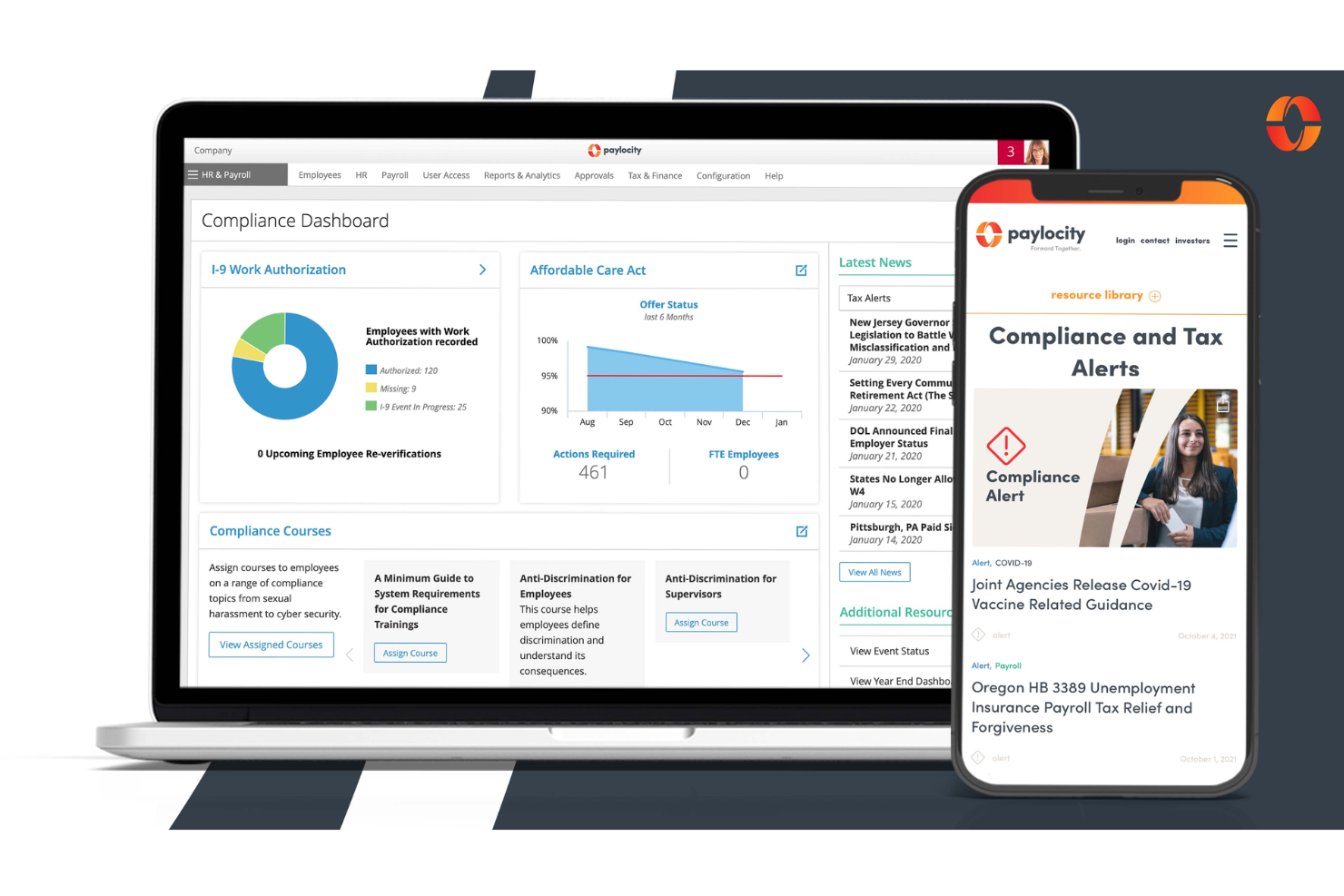
Credit: peoplemanagingpeople.com
Introduction To Hr Compliance Software
HR compliance is a critical aspect of managing a company’s workforce. Keeping up with laws and regulations can be challenging. This is where HR compliance software comes in. It helps businesses stay compliant and avoid costly penalties. In this section, we will explore the importance of HR compliance software and the challenges it addresses.
Importance Of Compliance
Compliance ensures that a company follows local, state, and federal laws. It protects the company from legal issues. Compliance also builds trust with employees. It ensures fair treatment and safety. An effective HR compliance software can streamline these processes. It keeps records organized and up-to-date.
Challenges In Hr Compliance
Managing compliance manually can be overwhelming. Laws change frequently. Keeping up with these changes is hard. Mistakes can lead to fines and penalties. HR compliance software helps mitigate these risks. It automates updates and notifications. This ensures that nothing is overlooked.
| Manual Compliance | HR Compliance Software |
|---|---|
| Time-consuming | Automated processes |
| Prone to errors | Accurate and reliable |
| Hard to track changes | Real-time updates |
In summary, HR compliance software is essential. It simplifies compliance management. It reduces risks and ensures smooth operations.
Key Features To Look For
Choosing the right HR compliance software can be challenging. It must meet your needs and ensure your organization stays compliant. Below are key features to consider when selecting HR compliance software.
Automated Reporting
Automated reporting is a crucial feature. It saves time and reduces errors. Reports are generated automatically based on the data entered. This ensures accuracy and consistency.
With automated reporting, you can schedule regular reports. This helps you stay on top of compliance requirements. You can also customize reports to suit your specific needs.
Regulatory Updates
Regulatory updates are essential for HR compliance. Laws and regulations change frequently. Your software must keep you informed of these changes.
Look for software that provides real-time updates. This ensures you always comply with the latest regulations. Some software even offers alerts and notifications for new laws.
Benefits of Regulatory Updates:
- Stay compliant with new laws
- Receive real-time updates
- Get alerts and notifications
Top Hr Compliance Software In 2025
HR compliance is crucial for businesses. Keeping up with regulations can be tough. The right software helps. In 2025, some tools stand out. They make compliance easier and more efficient.
Software A Overview
Software A is a leading choice. It offers many features. Companies can track and manage compliance tasks. It has a user-friendly interface. Even beginners can navigate it easily.
- Automated Alerts: Get reminders for important deadlines.
- Document Management: Store and organize all compliance documents.
- Audit Trails: Keep a record of all compliance activities.
- Reporting Tools: Generate detailed compliance reports.
Software A integrates with other HR tools. It makes the transition smooth. You won’t need separate software for different tasks. Everything is in one place.
| Feature | Description |
|---|---|
| Automated Alerts | Reminds users of key compliance dates. |
| Document Management | Organizes compliance files securely. |
| Audit Trails | Logs all compliance-related actions. |
| Reporting Tools | Creates comprehensive compliance reports. |
Software B Overview
Software B is also a top choice. It is known for its robust features. It helps businesses stay compliant with ease. The software is reliable and efficient.
- Real-Time Monitoring: Keep track of compliance status instantly.
- Policy Management: Create and update compliance policies easily.
- Training Modules: Educate employees on compliance requirements.
- Risk Assessment: Identify and mitigate compliance risks.
Software B supports multiple languages. This feature is useful for global companies. It ensures everyone understands the compliance requirements.
| Feature | Description |
|---|---|
| Real-Time Monitoring | Provides instant compliance updates. |
| Policy Management | Helps create and manage policies. |
| Training Modules | Offers compliance training to staff. |
| Risk Assessment | Evaluates and addresses compliance risks. |
Choosing the right HR compliance software is vital. Software A and Software B are top options for 2025. They simplify compliance tasks and improve efficiency.
Comparative Analysis
Choosing the best HR compliance software can be challenging. A detailed comparative analysis helps you make the right decision. This section covers pricing and features of leading HR compliance software.
Pricing Comparison
Pricing is a critical factor for businesses. HR compliance software varies in cost. Some have a monthly subscription. Others offer a one-time purchase. Compare the total cost over a year. Consider any hidden fees. Free trials are available for many options. This helps you test the software before buying.
Feature Comparison
Features are key to choosing the right software. Some software offers basic compliance tracking. Others provide advanced features like automated alerts, document management, and employee training modules. Ensure the software fits your business needs. Look for user-friendly interfaces. Customization options are a plus. Integration with existing systems is vital. Reporting tools help track compliance progress. Choose software that offers comprehensive support.
Benefits Of Using Hr Compliance Software
HR compliance software offers many advantages for businesses. It helps ensure that organizations follow labor laws. Compliance with rules and regulations is crucial. Companies can avoid fines and legal issues by using this software. Below are some of the benefits.
Efficiency Improvement
HR compliance software automates many tasks. Manual paperwork takes time and effort. Automation saves time. This software keeps records organized. It tracks employee information, policy updates, and compliance deadlines. This improves productivity.
Managers can quickly find information. They do not have to search through piles of papers. This also reduces errors. Accurate data is stored in one place. Efficiency improves when work becomes easier.
Risk Reduction
HR compliance software reduces legal risks. Non-compliance with labor laws can result in fines. It can also damage a company’s reputation. This software ensures that the company follows all rules.
It sends alerts for upcoming compliance deadlines. This helps in avoiding penalties. The software also provides templates and guidelines. These are helpful for creating compliant policies and procedures.
In short, HR compliance software is a valuable tool. It improves efficiency and reduces risks. Businesses can focus on growth without worrying about compliance issues.
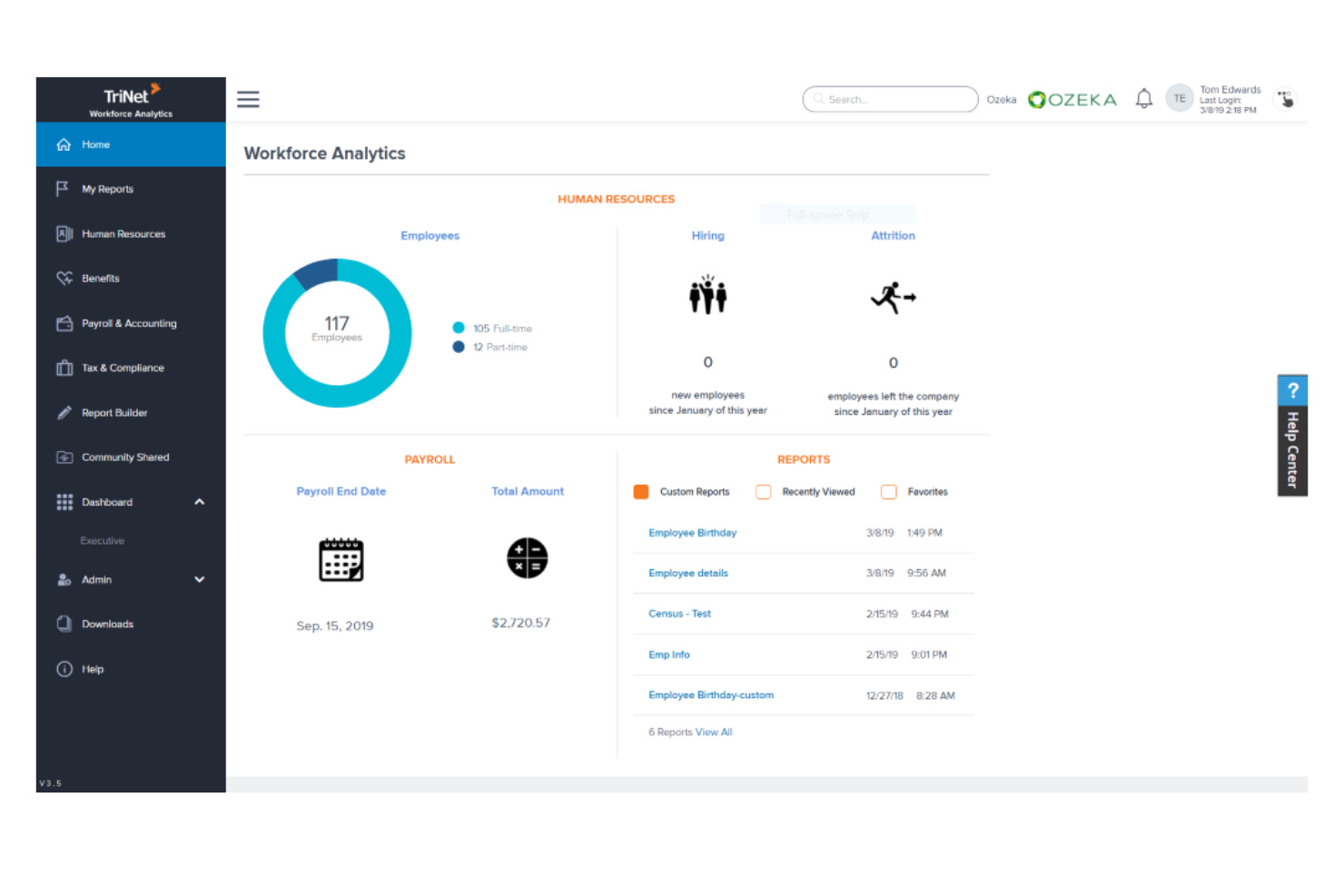
Credit: peoplemanagingpeople.com
How To Choose The Right Software
Selecting the best HR compliance software can be a daunting task. HR compliance is crucial for any business to avoid legal issues and ensure smooth operations. Here are key steps to help you choose the right software.
Assessing Company Needs
Start by understanding your company’s specific needs. Different businesses have different HR compliance requirements. Make a list of what you need from the software.
- Do you need features for employee training?
- Is document management a priority?
- How important is audit support for your business?
Create a detailed checklist. This will guide your decision-making process.
Evaluating Vendor Support
Vendor support is critical. You need software that offers good support services.
Check if the vendor provides:
| Support Type | Details |
|---|---|
| 24/7 Support | Round-the-clock assistance for urgent issues. |
| Training | Comprehensive training for your team. |
| Maintenance | Regular updates and maintenance services. |
Good vendor support ensures you can resolve issues quickly.
Implementation Tips
Choosing the best HR compliance software is a significant step for any organization. But the real challenge lies in its successful implementation. Proper implementation ensures that the software runs smoothly and meets your HR needs efficiently. Let’s delve into some practical tips for a seamless transition.
Staff Training
Training your staff is crucial for a smooth implementation. Start by organizing training sessions to introduce the software. Use simple guides and hands-on practice to enhance understanding. Make sure everyone knows how to use the basic features. Offer continuous support to address any queries.
Consider appointing a few super users. They can help other employees and ensure consistent usage. Regular check-ins can help track progress and solve issues promptly.
Data Migration
Data migration can be tricky. Plan it carefully to avoid data loss. Start with a thorough audit of your current data. Ensure all information is up-to-date and relevant. Clean up any outdated or incorrect data to ease the migration process.
Create a step-by-step plan for transferring data. Test the migration process on a small scale first. This helps identify and fix any issues before a full-scale migration. Once confident, proceed with the complete data transfer. Always back up your data to prevent any loss during the transition.
Future Trends In Hr Compliance Software
The future of HR compliance software is shaping up to be exciting. Rapid advancements in technology are driving new features. These features promise to make HR tasks easier and more accurate. Let’s explore some of these trends.
Ai Integration
Artificial Intelligence (AI) is making its way into HR compliance software. AI can help in automating repetitive tasks. This includes checking documents and monitoring compliance deadlines. With AI, HR teams can focus on more strategic activities.
AI can also help in identifying patterns and trends. This can alert HR professionals to potential compliance issues before they become problems. For example, AI can analyze employee data and flag inconsistencies. This helps in maintaining accurate records and avoiding penalties.
Enhanced Analytics
Enhanced analytics is another major trend. HR compliance software is now offering more detailed reports. These reports provide insights into compliance status and areas that need attention.
With enhanced analytics, HR teams can better understand their compliance landscape. They can track progress and identify bottlenecks. This leads to more informed decision-making and improved compliance.
| Feature | Benefit |
|---|---|
| AI Integration | Automates tasks and identifies patterns. |
| Enhanced Analytics | Provides detailed reports and insights. |
The integration of these technologies is transforming HR compliance. It is making it more efficient and reliable. As these trends continue to evolve, HR compliance software will become an even more essential tool for businesses.
Customer Success Stories
Exploring the best HR compliance software can be overwhelming. Understanding how it works for real companies can help. Here are some customer success stories that highlight the effectiveness of top HR compliance software.
Case Study 1
Company: Tech Innovators Inc.
Challenges faced:
- High employee turnover
- Compliance with labor laws
- Tracking employee certifications
Solution:
Tech Innovators Inc. implemented HR Compliance Pro software. It streamlined their compliance processes.
Results:
| Metric | Before | After |
|---|---|---|
| Employee turnover rate | 15% | 8% |
| Compliance violations | 10/year | 2/year |
| Certification tracking accuracy | 70% | 95% |
Case Study 2
Company: Healthcare Solutions Ltd.
Challenges faced:
- Managing employee health records
- Ensuring compliance with health regulations
- Updating policies efficiently
Solution:
Healthcare Solutions Ltd. adopted ComplianceTrack HR software. It helped them manage records and compliance.
Results:
- Improved health record management by 50%
- Reduced compliance audit issues by 70%
- Policy updates were 30% faster
These case studies illustrate how HR compliance software can address specific challenges. Real-world examples show it can improve efficiency, reduce errors, and ensure compliance.

Credit: www.brightmine.com
Frequently Asked Questions
What Is Hr Compliance Software?
HR compliance software helps businesses adhere to labor laws and regulations. It automates compliance processes, reducing errors and ensuring accuracy.
Why Is Hr Compliance Software Important?
HR compliance software is crucial for avoiding legal penalties. It streamlines the compliance process, ensuring your business adheres to ever-changing regulations.
How Does Hr Compliance Software Work?
HR compliance software automates regulatory tasks, tracks policy changes, and generates compliance reports. It helps HR teams stay updated and compliant.
What Features Should Hr Compliance Software Have?
Key features include automated reporting, policy tracking, employee training modules, and audit trails. These ensure comprehensive compliance management.
Conclusion
Choosing the right HR compliance software can simplify your processes. It ensures your company meets regulations efficiently. The best software offers features like automated reporting and document management. This reduces manual work and minimizes errors. Evaluate options based on your specific needs and budget.
A good choice will save time, reduce stress, and keep your business compliant. Stay ahead and protect your organization with reliable HR compliance tools. Make the decision today for a smoother tomorrow.
]]>Small businesses often struggle with managing HR tasks efficiently. From recruiting to payroll, the workload can be overwhelming. This is where HR software comes in. It automates and simplifies these processes, making your job easier. But with so many options, which one is the best for your needs?
In this blog post, we will explore the best HR software for small businesses. We’ll look at their features, benefits, and what makes them stand out. By the end, you’ll have a clear idea of the best tools to help manage your HR tasks efficiently. Let’s dive in!

Credit: web.hr
Introduction To Hr Software
Human Resources (HR) software helps businesses manage their workforce efficiently. For small businesses, this technology can be a game-changer. It automates many tasks and saves precious time.
HR software includes features like payroll management, attendance tracking, and employee records. It provides a centralized platform for all HR activities. This helps small businesses manage their teams better.
Importance For Small Businesses
Small businesses often have limited resources. HR software can help them do more with less. It reduces the need for manual work and minimizes errors. This leads to better productivity and happier employees.
HR software also ensures compliance with labor laws. This is crucial for avoiding legal issues. Small businesses can focus on growth, knowing their HR tasks are handled.
Key Features To Look For
When choosing HR software, look for certain key features. Payroll management is essential. It should automate salary calculations and tax deductions. Time and attendance tracking is also important. This feature ensures accurate work records.
Another key feature is employee self-service. This allows employees to update their own information. It reduces the HR workload. Performance management tools are also valuable. They help track employee progress and set goals.
Finally, consider integration capabilities. The software should work well with other systems. This ensures a smooth workflow. By focusing on these key features, small businesses can find the best HR software for their needs.
Benefits Of Hr Software
HR software offers numerous benefits for small businesses. It simplifies many HR tasks, improves the overall employee experience, and ensures compliance with regulations. Investing in HR software can save time and reduce stress for business owners and HR professionals.
Streamlining Hr Tasks
HR software can automate routine HR tasks. This includes payroll processing, tracking attendance, and managing employee records. Automation reduces manual errors and saves valuable time. HR software also helps in organizing documents and generating reports. This ensures HR tasks are handled efficiently.
Improving Employee Experience
HR software enhances the employee experience. Employees can access their information easily. They can check their schedules, request time off, and view their pay stubs. This self-service feature empowers employees and increases their satisfaction.
HR software also supports better communication. It allows employees to receive updates and important messages quickly. Good communication fosters a positive work environment. Happy employees are more productive and loyal.
Top Hr Software Solutions
Choosing the right HR software is crucial for small businesses. It can streamline your HR processes, enhance employee management, and improve overall efficiency. In this section, we will explore the top HR software solutions available for small businesses. We will compare them based on several key criteria to help you make an informed decision.
Comparison Criteria
When evaluating HR software, consider these important factors:
- Features: What features does the software offer?
- Pricing: How much does the software cost?
- Scalability: Can the software grow with your business?
- Customer Support: What kind of support is available?
Ease Of Use And Customization
For small businesses, ease of use is vital. Your team should quickly learn how to use the software without extensive training. Look for software with an intuitive interface and clear instructions.
Customization options are also important. You might need to tailor the software to fit your specific business needs. Check if the software allows you to customize fields, reports, and workflows.
| Software | Ease of Use | Customization |
|---|---|---|
| Software A | High | Moderate |
| Software B | Moderate | High |
| Software C | Low | Low |
Based on these criteria, choose the HR software that best fits your small business needs. Remember, the right software can significantly impact your HR efficiency and overall business success.
Bamboohr
BambooHR is a top choice for small businesses. It offers an easy-to-use platform. HR tasks become simple and efficient. You can manage employee data, track time, and more.
Features And Benefits
BambooHR provides many valuable features. You can store employee information in one place. This makes data management easy. The software has a user-friendly interface. Even non-tech people can use it.
Time tracking becomes effortless. Employees can log their hours easily. Managers can approve time-off requests quickly. The performance management tools are useful. You can set goals and track progress. This helps improve employee productivity.
BambooHR also offers reporting tools. You can create custom reports. This helps in making informed decisions. The mobile app adds more convenience. You can manage HR tasks on the go.
Pricing And Plans
BambooHR offers flexible pricing. You can choose a plan that fits your budget. The pricing depends on the number of employees. They offer a free trial. This allows you to test the software before buying.
There are two main plans: Essentials and Advantage. The Essentials plan covers basic HR tasks. The Advantage plan includes more features. You can contact BambooHR for a custom quote. This ensures you pay only for what you need.
Gusto
Choosing the right HR software is crucial for small businesses. Gusto is a popular choice for its user-friendly interface and comprehensive features. It offers tools that streamline payroll, benefits, and HR management. Let’s dive into what makes Gusto a standout option.
Features And Benefits
Gusto offers a range of features that cater to small businesses:
- Automated Payroll: Gusto simplifies payroll with automated processes. This reduces the risk of errors and saves time.
- Employee Benefits: Easily manage health insurance, retirement plans, and more. Gusto partners with leading providers to offer competitive plans.
- Time Tracking: Track employee hours with ease. Gusto integrates with time tracking tools to ensure accurate pay.
- HR Tools: Access employee onboarding, compliance, and performance management features. These tools help keep your business organized and compliant.
- Customer Support: Gusto offers excellent customer service. Access help via chat, phone, or email.
Pricing And Plans
Gusto offers flexible pricing plans to suit various needs:
| Plan | Features | Cost |
|---|---|---|
| Core | Basic payroll and benefits management | $39/month + $6 per person |
| Complete | Advanced HR tools and compliance support | $39/month + $12 per person |
| Concierge | Comprehensive HR support with dedicated experts | $149/month + $12 per person |
Gusto also offers a free demo. This helps you understand how the software fits your business needs before committing.
Credit: icomppayroll.com
Zoho People
Zoho People is the ideal HR software for small businesses. It simplifies managing employee data, attendance, and performance. Effortlessly streamline HR tasks.
Zoho People is a comprehensive HR software designed for small businesses. It helps manage employee records, attendance, and performance. Zoho People provides an easy-to-use platform to streamline HR processes. This software supports small businesses in staying organized and efficient.Features And Benefits
Zoho People offers many useful features. The employee database allows easy access to all records. Time tracking helps monitor work hours and attendance. The leave management system simplifies vacation requests. Performance appraisals enable easy employee evaluations. Automated workflows save time and reduce errors. The self-service portal empowers employees to manage their data. These features improve overall HR efficiency.Pricing And Plans
Zoho People provides flexible pricing options. The Free plan offers basic features for up to five users. The Essential HR plan starts at $1 per user per month. The Professional plan, with advanced features, costs $2 per user per month. The Premium plan, at $3 per user per month, includes more integrations. The Enterprise plan, at $5 per user per month, offers all features. Each plan caters to different business needs and budgets.Adp Workforce Now
ADP Workforce Now is a leading HR software designed for small businesses. It offers a comprehensive suite of tools to manage your HR needs. From payroll to benefits and talent management, ADP Workforce Now simplifies HR processes. It helps you save time and reduce errors. This software is user-friendly and scalable, making it perfect for growing businesses.
Features And Benefits
ADP Workforce Now comes with a variety of features. Payroll processing is seamless and accurate. It automates deductions and tax filings. Employee self-service portals allow staff to access their information. This reduces the workload on HR. The benefits administration feature is easy to use. It helps you manage health insurance, retirement plans, and more. Talent management tools help with recruitment and performance reviews. The software also offers compliance support to stay updated with regulations.
Pricing And Plans
ADP Workforce Now offers flexible pricing plans. Costs depend on the size of your business and the features you need. There is no one-size-fits-all price. It’s best to contact ADP for a customized quote. They offer a variety of plans to suit different business needs. The plans are scalable as your business grows. This ensures you always have the right tools for your HR needs.
Choosing The Right Hr Software
Choosing the right HR software is a critical decision for small businesses. The right solution can streamline processes, save time, and help manage employees effectively. It’s important to consider your specific needs and what features will benefit your business the most.
Evaluating Your Business Needs
Before selecting HR software, evaluate your business needs. Create a list of necessary features and prioritize them. Common features include:
- Employee records management
- Payroll processing
- Time and attendance tracking
- Recruitment and onboarding
- Performance management
Consider the size of your team and your budget. Small businesses often need software that is affordable and easy to use. Scalability is also important. The software should grow with your business.
Consult with your HR team to understand their pain points. Their input is valuable in choosing software that addresses real challenges.
Making The Final Decision
After evaluating your needs, research available HR software options. Look at reviews and case studies. Compare different products and see which ones best match your requirements.
| Software | Features | Price | Scalability |
|---|---|---|---|
| Software A | Full suite | $$ | High |
| Software B | Basic features | $ | Low |
Request demos and trials to test the software. This allows you to see the user interface and check if it is user-friendly. Ensure the software integrates with your existing systems. Smooth integration reduces the learning curve and implementation time.
Finally, consider customer support. Good support can make a significant difference in your experience. Check if they offer training sessions, support tickets, and timely responses.
By following these steps, you can choose the right HR software for your small business. This ensures a more efficient and productive work environment.
Credit: www.sloneek.com
Frequently Asked Questions
What Is The Best Hr Software For Small Businesses?
The best HR software for small businesses streamlines HR tasks, offers scalability, and provides excellent customer support. Popular options include Gusto, BambooHR, and Zoho People. These platforms are user-friendly, affordable, and feature-rich.
How Does Hr Software Help Small Businesses?
HR software helps small businesses manage employee data, automate payroll, track performance, and ensure compliance. It saves time, reduces errors, and improves efficiency by centralizing HR tasks in one platform.
What Features Should Hr Software Have?
HR software should have features like employee management, payroll processing, benefits administration, time tracking, and performance management. These features help streamline HR tasks and ensure smooth operations.
Is Hr Software Cost-effective For Small Businesses?
Yes, HR software is cost-effective for small businesses. It reduces manual tasks, minimizes errors, and saves time. Most solutions offer affordable pricing plans tailored for small businesses, ensuring value for money.
Conclusion
Choosing the best HR software is vital for small businesses. It simplifies tasks, saves time, and boosts productivity. Great software can streamline hiring, payroll, and employee management. Investing in the right tool helps your business grow. Evaluate your needs, compare features, and read user reviews.
Make sure the software fits your budget and is easy to use. With the right HR software, managing your small business becomes much easier and efficient.
]]>The best HR case management software can help streamline your HR processes, making your team more productive and your employees happier. In today’s fast-paced work environment, HR teams face numerous challenges. From handling employee queries to managing compliance issues, the workload can be overwhelming.
This is where HR case management software comes into play. It simplifies the process, allowing HR professionals to track, manage, and resolve cases swiftly. Choosing the right software can save time and reduce errors, leading to a more organized and effective HR department. This blog post will guide you through the top HR case management software options, helping you find the perfect fit for your needs.

Credit: www.aihr.com
Introduction To Hr Case Management Software
HR case management software has become essential in modern HR departments. It helps manage employee queries, grievances, and requests efficiently. This software improves communication, tracks cases, and ensures timely resolution. Understanding its importance and evolution can help HR teams choose the right solution.
Importance In Modern Hr
HR case management software is crucial for handling employee issues. It streamlines processes, reducing manual work and errors. This software ensures consistent handling of cases, fostering trust among employees. It also provides valuable insights through data analytics. These insights help HR make better decisions and improve policies.
Moreover, this software enhances compliance with labor laws. It keeps detailed records of all interactions and resolutions. This feature is vital during audits or legal disputes. A well-managed HR case system also boosts employee satisfaction. Happy employees are more productive and loyal to the company.
Evolution Of Hr Software
HR software has evolved significantly over the years. Initially, HR tasks were manual and time-consuming. Early software focused on payroll and attendance. Over time, the need for comprehensive HR solutions grew. Modern HR software now includes case management features.
These advancements have transformed HR operations. Today’s HR case management software integrates with other HR systems. It offers mobile access, making it convenient for on-the-go use. Artificial intelligence and machine learning are also enhancing its capabilities. Predictive analytics help identify potential issues before they escalate.
The evolution of HR software continues. Future developments will focus on improving user experience and automation. As technology advances, HR case management software will become even more integral. Staying updated with these changes is vital for effective HR management.
Key Features To Look For
Choosing the best HR case management software can be challenging. Knowing the key features can make this easier. These features help improve HR efficiency and employee satisfaction.
User-friendly Interface
A user-friendly interface is essential. It ensures that all employees can navigate the software easily. This reduces training time and improves productivity. Look for intuitive design and clear instructions.
Automation Capabilities
Automation capabilities save time and reduce errors. The software should automate repetitive tasks. For example, handling employee requests and generating reports. This allows HR staff to focus on more important tasks.
Integration With Other Systems
The software should integrate with other systems. This includes payroll, attendance, and performance management. Seamless integration ensures smooth data flow. It also prevents data duplication and errors.
Top Hr Case Management Software Of 2025
As 2025 approaches, the demand for efficient HR case management software continues to grow. Companies are searching for the best tools to streamline their HR processes. This guide highlights the top HR case management software of 2025. We will explore leading solutions and emerging contenders.
Leading Solutions
Some software stands out due to their features and user satisfaction. Here are the leading solutions:
- ZenHR: Known for its user-friendly interface and robust reporting capabilities. ZenHR simplifies case tracking and resolution.
- BambooHR: Offers comprehensive HR management tools. BambooHR integrates seamlessly with other platforms and ensures data accuracy.
- PeopleSoft: A trusted name in HR solutions. PeopleSoft provides a wide range of functionalities for large organizations.
Emerging Contenders
Several new contenders are making waves in the HR software market. These emerging solutions bring innovative features and fresh perspectives:
- Freshteam: Offers an intuitive interface and customizable workflows. Freshteam helps manage employee queries with ease.
- Zoho People: Known for its flexibility and automation capabilities. Zoho People is gaining popularity among small to mid-sized companies.
- HR Case Pro: A new player with strong case management features. HR Case Pro focuses on efficiency and user experience.
Choosing the right HR case management software depends on your organization’s needs. Evaluate these options based on their features, usability, and integration capabilities.

Credit: peoplemanagingpeople.com
Comparing Leading Solutions
Choosing the best HR case management software can be challenging. There are many options on the market, each with unique features. This section compares leading solutions to help you make an informed decision.
Feature Comparison
Different software solutions offer various features. Some common features include ticketing systems, workflow automation, and reporting tools. Look for software that integrates with your existing systems. Security is another critical feature. Ensure the software has strong data protection measures. User interface and ease of use are also important. Your team should find the software intuitive and easy to navigate. Customization options can help tailor the software to your needs. Finally, consider the level of customer support provided.
Pricing Models
Pricing models vary between software solutions. Some offer a subscription-based model. You pay a monthly or annual fee for access. Other solutions may charge a one-time license fee. Consider your budget and the total cost of ownership. Some software includes hidden costs like maintenance fees. Free trials or demos can help you evaluate the software before committing. Always read the fine print to understand all costs involved.
Benefits Of Using Hr Case Management Software
HR case management software offers numerous benefits for organizations. This software helps HR teams manage employee cases more efficiently. Let’s explore some key advantages of using HR case management software.
Improved Efficiency
HR case management software streamlines workflows and processes. It automates repetitive tasks, saving time for HR staff. This allows them to focus on more strategic activities. The software enables quick access to case information. This reduces the time spent searching for documents. It also helps track case progress easily. The result? Faster resolution of employee issues.
Enhanced Compliance
Maintaining compliance is crucial for any organization. HR case management software helps ensure that all actions are documented. This creates a clear audit trail for every case. The software can provide reminders for important deadlines. This helps in avoiding penalties for non-compliance. It also ensures that policies and procedures are followed consistently. This reduces the risk of legal issues and improves overall compliance.
Challenges And Considerations
Choosing the best HR case management software can be challenging. Various factors come into play that businesses must consider. These challenges and considerations are critical to ensure a smooth experience.
Implementation Challenges
Implementing new software often involves various obstacles. Companies need to align the software with existing systems. This can be time-consuming and complex.
Training employees to use the new system is another challenge. It requires both time and resources. Ensuring that the software integrates seamlessly with current processes is crucial.
| Challenge | Solution |
|---|---|
| System Alignment | Careful planning and consultation |
| Employee Training | Comprehensive training programs |
| Integration | Ensure compatibility checks |
Data Security Concerns
Data security is a top priority for any HR software. Companies handle sensitive employee information. A breach could have severe consequences.
Ensuring that the software has robust security measures is essential. This includes encryption, regular security updates, and compliance with data protection laws.
- Encryption: Protects data during transmission
- Security Updates: Keeps the system secure from threats
- Compliance: Ensures adherence to data protection regulations
Choosing software with strong security features is non-negotiable. It’s vital to protect both the company and employee data.
Case Studies And Success Stories
Understanding the value of HR case management software is vital. Real-world examples help illustrate its impact. Let’s explore success stories from two companies.
Company A’s Experience
Company A faced many HR issues. These included inefficient processes and a lack of organization. They adopted HR case management software to address these problems.
The software streamlined their workflows. It improved response times significantly. HR teams could now track cases easily. This led to quicker resolutions. Employee satisfaction increased.
Key Benefits:
- Improved Efficiency: Reduced processing times by 40%
- Better Organization: Centralized case tracking
- Higher Employee Satisfaction: Faster issue resolution
Company B’s Transformation
Company B had issues with employee communications. They struggled to keep track of numerous HR requests. Implementing the HR case management software transformed their operations.
The software provided a clear overview of all cases. It allowed prioritization of urgent matters. Staff felt more supported. The system also reduced administrative work.
Key Outcomes:
- Enhanced Communication: Clear tracking of HR requests
- Increased Support: Staff felt their issues were a priority
- Reduced Admin Work: Less manual tracking

Credit: www.aihr.com
Future Trends In Hr Case Management
The future of HR case management is evolving rapidly. Emerging technologies and trends are shaping the way HR departments function. Keeping up with these trends is crucial for maintaining efficient and effective HR operations.
Ai And Machine Learning
AI and Machine Learning are transforming HR case management. These technologies help in automating repetitive tasks. They analyze large volumes of data quickly and accurately.
AI can identify patterns in employee behavior. It can also predict potential HR issues. This allows HR teams to take proactive measures.
Machine Learning improves the accuracy of case management. It learns from past cases and suggests the best resolutions. This reduces the time spent on resolving cases.
Here are some benefits of AI and Machine Learning in HR case management:
- Automated task management
- Predictive analytics
- Improved decision making
- Enhanced employee experience
Increased Customization
Customization is becoming more important in HR case management software. Each organization has unique needs and workflows.
Customizable software allows HR teams to tailor the system to their specific requirements. This improves efficiency and effectiveness.
Custom fields, templates, and workflows are some features that enhance customization. They help in aligning the software with the company’s processes.
Additionally, customizable dashboards provide real-time insights. They help in monitoring key metrics and performance indicators.
Here is a table summarizing the benefits of increased customization:
| Benefit | Description |
|---|---|
| Efficiency | Streamlined processes save time and resources |
| Effectiveness | Tailored solutions meet specific needs |
| Real-time insights | Custom dashboards provide up-to-date information |
| Employee satisfaction | Personalized experiences improve satisfaction |
Frequently Asked Questions
What Is Hr Case Management Software?
HR case management software streamlines HR processes. It helps manage employee inquiries, track issues, and ensures compliance. This software enhances efficiency.
Why Is Hr Case Management Important?
HR case management centralizes employee data. It improves response times and ensures consistent handling of HR issues. This boosts employee satisfaction.
How Does Hr Case Management Software Work?
HR case management software automates workflow. It assigns, tracks, and resolves employee cases efficiently. The software also provides detailed reporting.
What Features Should Hr Case Management Software Have?
Look for user-friendly interface, automation, case tracking, reporting, and integration capabilities. These features enhance HR efficiency and accuracy.
Conclusion
Selecting the best HR case management software can simplify your HR tasks. It boosts efficiency and helps manage cases better. Choose software that fits your company’s needs. Look for features that support your HR goals. Remember, good software can save time and reduce stress.
It’s a valuable investment for your team. Make an informed choice and see the benefits in your daily operations.
]]>Finding the right HR software can streamline operations, save time, and enhance productivity. Nonprofits often face unique challenges. Limited budgets and resources mean every decision counts. The right HR software can make a significant difference. It helps with recruiting, onboarding, payroll, and compliance.
Plus, it can improve employee engagement and retention. In this blog post, we will explore the best HR software options for nonprofits. Our goal is to help you find a solution that fits your needs and budget. Whether you’re a small charity or a large foundation, there’s an HR software out there for you. Let’s dive in and discover the best tools to support your mission.
Introduction To Hr Software For Nonprofits
Nonprofits work tirelessly to make the world a better place. Managing human resources effectively helps them achieve their goals. HR software can make this process smoother and more efficient.
Importance Of Hr Software
HR software helps manage employee data and workflows. It simplifies tasks like payroll, benefits, and recruitment. This allows nonprofits to focus on their mission.
Streamlined HR processes save time and reduce errors. This is vital for nonprofits with limited resources. Effective HR management also boosts employee morale. Happy staff contribute more to the cause.
Challenges Faced By Nonprofits
Nonprofits often operate on tight budgets. This makes it hard to invest in quality HR solutions. They also have to manage diverse teams, including volunteers. This adds complexity to HR tasks.
Compliance with labor laws is another challenge. Nonprofits must ensure they meet all legal requirements. This can be difficult without the right tools. HR software helps overcome these challenges. It provides a central system to manage all HR activities.

Credit: bestreviews.net
Key Features To Look For
Choosing the best HR software for nonprofits can be challenging. You need to find a solution that meets your unique needs. Here are key features to look for in HR software designed for nonprofits.
Volunteer Management
Managing volunteers is crucial for nonprofits. The right HR software should offer robust volunteer management tools. This includes tracking volunteer hours and skills. It should also help with scheduling and communication. Effective volunteer management ensures your projects run smoothly.
Donor And Fund Management
Nonprofits rely on donations and funding. Your HR software should have strong donor and fund management capabilities. This includes tracking donations and donor information. It should also help with fundraising campaigns. Keeping track of finances is essential for transparency and growth.
Compliance Tracking
Nonprofits must comply with various regulations. The HR software you choose should assist with compliance tracking. This includes managing certifications and documentation. It should also help ensure you meet all legal requirements. Staying compliant avoids fines and maintains your nonprofit’s reputation.
Top Hr Software Options
Choosing the right HR software for your nonprofit can be challenging. You need a system that is cost-effective, efficient, and easy to use. Below are three top HR software options tailored for nonprofits. Each offers unique features to help you manage your team effectively.
Software A Overview
Software A is an excellent option for nonprofits. It offers a range of features that streamline HR tasks.
- Employee Database Management: Keep all employee information in one place.
- Payroll Processing: Easily handle payroll with automated features.
- Time Tracking: Track employee hours and manage schedules efficiently.
The user-friendly interface ensures that even those with limited tech skills can navigate it easily.
Software B Overview
Software B is another great choice for nonprofits. It focuses on simplifying HR processes and improving communication.
- Onboarding: Simplify the onboarding process for new hires.
- Performance Management: Monitor and evaluate employee performance.
- Document Storage: Securely store and manage important documents.
Its robust reporting tools help you track key HR metrics and make informed decisions.
Software C Overview
Software C stands out for its comprehensive features and affordability. It provides a complete HR solution for nonprofits.
- Recruitment: Manage job postings and applications with ease.
- Training Management: Organize and track employee training programs.
- Benefits Administration: Manage employee benefits and insurance plans.
This software is designed to grow with your organization, offering scalability and flexibility.
Benefits Of Using Hr Software
HR software has become a crucial tool for nonprofits aiming to improve their operations. This software offers numerous benefits. These range from improving efficiency and productivity to enhancing data security and cost savings. Let’s explore these benefits in detail.
Efficiency And Productivity
HR software automates many tasks. This includes tracking employee records and managing payroll. Automation reduces manual work. Hence, HR teams can focus on strategic tasks. This boosts overall productivity.
The software also streamlines communication. Staff can easily access information. They can view policies, request time off, and check schedules. This reduces confusion and saves time.
Data Security
Nonprofits handle sensitive information. This includes personal details of employees and donors. HR software provides robust data security measures. It ensures that all data is stored securely.
Many HR solutions offer features like encryption. They also include role-based access. This means only authorized personnel can access specific data. This reduces the risk of data breaches.
Cost Savings
Using HR software can lead to significant cost savings. Automation reduces the need for extensive HR staff. Hence, nonprofits can allocate funds elsewhere.
Additionally, the software helps in reducing errors. Errors in payroll or employee records can be costly. Automated systems ensure accuracy. This minimizes financial losses.
Here is a table summarizing these benefits:
| Benefit | Description |
|---|---|
| Efficiency and Productivity | Automates tasks and streamlines communication |
| Data Security | Provides robust security measures |
| Cost Savings | Reduces need for extensive HR staff and minimizes errors |
Implementation Tips
Implementing HR software in nonprofits can be a smooth process with careful planning. This section provides practical tips to ensure successful software adoption. Focus on the key areas of choosing the right software, training staff, and exploring customization options.
Choosing The Right Software
Selecting the best HR software requires thorough research. Consider these factors:
- Budget: Look for affordable solutions that offer essential features.
- Scalability: Ensure the software can grow with your organization.
- Integration: Check compatibility with existing systems.
- User-friendliness: Opt for intuitive interfaces to reduce training time.
Training Staff
Training is crucial for effective software use. Follow these steps:
- Identify key users: Select staff who will use the software daily.
- Develop a training plan: Create a schedule for training sessions.
- Use various methods: Combine webinars, in-person training, and manuals.
- Offer continuous support: Provide helpdesk support for ongoing issues.
Customization Options
Customization enhances software efficiency. Here are some options:
| Option | Benefit |
|---|---|
| Custom Reports | Generate tailored reports for specific needs. |
| Role-Based Access | Set permissions based on user roles. |
| Workflow Automation | Automate repetitive tasks to save time. |
Implementing these tips will ensure a smooth transition and effective use of HR software in your nonprofit organization.
Case Studies Of Successful Implementations
Nonprofits often face unique challenges in managing their human resources. The right HR software can make a significant difference. Below are case studies showcasing successful implementations of HR software by nonprofits.
Nonprofit A Success Story
Nonprofit A struggled with outdated HR processes. Their manual systems led to errors and inefficiencies. They decided to implement a new HR software. The software streamlined their payroll, attendance tracking, and employee management. Within months, the organization saw improved productivity. Employee satisfaction also increased.
The HR software provided real-time data and insights. This helped the management make better decisions. The onboarding process became smoother. New hires felt more welcomed and informed. Overall, Nonprofit A’s operations became more efficient and effective.
Nonprofit B Success Story
Nonprofit B faced issues with volunteer management. They had a large number of volunteers to coordinate. The previous system was not scalable. They chose an HR software tailored for nonprofits. This software included features for volunteer scheduling and communication.
The software allowed for easy tracking of volunteer hours. It sent automated reminders for upcoming shifts. Volunteers appreciated the user-friendly interface. They could access their schedules online. The organization saved time on administrative tasks. This allowed them to focus more on their mission. Nonprofit B’s volunteer retention rates improved significantly.
Common Pitfalls To Avoid
Choosing the best HR software for nonprofits can be challenging. There are common pitfalls that many organizations face. Avoiding these can save time and resources. Let’s explore some of these pitfalls.
Underestimating Costs
Many nonprofits think HR software is a one-time expense. This is not true. There are often hidden costs. These can include updates, support, and training. Always ask for a detailed cost breakdown. This will help you budget accurately.
Inadequate Training
Staff needs proper training to use HR software effectively. Without it, they may struggle. This leads to errors and inefficiency. Invest in comprehensive training programs. Ensure everyone knows how to use the software correctly. This boosts productivity and confidence.
Ignoring User Feedback
Feedback from users is crucial. It highlights issues and areas for improvement. Ignoring this feedback can be costly. Regularly collect and review feedback. Make necessary adjustments based on it. This ensures the software meets your organization’s needs.
Credit: hrtech.sg
Future Trends In Nonprofit Hr Software
The nonprofit sector is evolving. Nonprofit HR software is also advancing. Future trends in this software aim to simplify tasks. They help organizations stay efficient. They also ensure compliance with regulations. Let’s dive into the key trends shaping the future of nonprofit HR software.
Ai And Automation
AI and automation are transforming HR processes. They reduce manual tasks. Automated systems handle repetitive work. This frees up time for strategic planning. AI can screen resumes quickly. It identifies the best candidates. Chatbots answer common employee questions. This improves response times and satisfaction.
Integration With Other Systems
HR software must integrate with other systems. This ensures smooth data flow. Integration with accounting software is crucial. It simplifies payroll and expense tracking. Linking HR systems with communication tools boosts collaboration. It keeps everyone on the same page. Integration enhances overall efficiency. It also reduces errors and saves time.
.jpg?length=1920)
Credit: www.gnsadmin.com
Frequently Asked Questions
What Is The Best Hr Software For Nonprofits?
The best HR software for nonprofits should cater to specific needs. Look for features like volunteer management, donation tracking, and compliance. Popular choices include BambooHR, Gusto, and Zoho People. These platforms offer customizable solutions that can streamline HR processes for nonprofit organizations.
How Does Hr Software Help Nonprofits?
HR software helps nonprofits by automating administrative tasks, managing volunteers, and ensuring compliance. It also facilitates payroll, benefits administration, and performance tracking. This allows nonprofits to focus more on their mission and less on paperwork. Efficient HR management leads to better employee and volunteer engagement.
What Features Should Nonprofit Hr Software Have?
Nonprofit HR software should include volunteer management, donation tracking, compliance tools, and payroll processing. It should also offer performance management, benefits administration, and reporting features. Customizable options are essential to meet the unique needs of nonprofits.
Is Hr Software Affordable For Nonprofits?
Yes, many HR software solutions offer affordable pricing plans for nonprofits. Some even provide discounts or special rates. It’s important to compare options and look for software that fits your budget. Investing in HR software can save time and money in the long run.
Conclusion
Choosing the right HR software is crucial for nonprofits. It simplifies tasks, saves time, and boosts efficiency. Evaluate your organization’s needs and budget. Look for software with strong support and user-friendly features. Effective HR tools can make a big difference.
They help manage volunteers, staff, and compliance. Investing in the best HR software leads to better team management. This, in turn, helps your nonprofit achieve its mission. Remember, the right choice supports your goals and enhances productivity.
]]>