As the digital landscape evolves, so do the tools that help us navigate it. Pinterest users, from content creators to marketers, need efficient ways to produce and manage visual content. That’s where advanced tools come into play. They not only save time but also ensure high-quality results. One such tool that stands out is Content Goblin. It’s designed to automate and simplify your Pinterest content creation process. With features like automated listicle generation and high-quality image creation, it streamlines your workflow. This blog will explore the top Pinterest tools in 2025, focusing on their unique benefits and how they can elevate your Pinterest game. Discover Content Goblin and enhance your Pinterest strategy today!
Introduction To Pinterest Automation Tools In 2025
Pinterest remains a powerful platform for marketers. In 2025, new automation tools have emerged to enhance its potential. Leveraging these tools can significantly impact your marketing strategy. Let’s explore why these tools are essential and how they can benefit you.
Overview Of Pinterest’s Marketing Potential
Pinterest is a visual discovery engine. It has over 400 million monthly active users. The platform is ideal for businesses aiming to drive traffic and sales. Users engage with pins that inspire and inform. This makes Pinterest a great place to showcase products and services.
In 2025, Pinterest’s marketing potential has grown. New features make it easier to reach and engage audiences. Marketers use Pinterest for content marketing, brand awareness, and customer engagement. The platform’s visual nature supports various industries, from fashion to food.
Why Using Pinterest Automation Tools Is Crucial In 2025
Using Pinterest automation tools in 2025 is vital. These tools streamline content creation and posting. They save time and reduce manual effort. Tools like Content Goblin automate listicle generation and image creation. This ensures high-quality content is produced quickly.
Content Goblin offers multiple features:
- Automated listicle generation
- High-quality image and text creation
- Customizable subheadings with an outline builder
- Integration with WordPress for direct posting
- Multiple image quality options
- Simplified workflow with a single platform for content and image creation
These features help streamline your workflow. You can post drafts directly to WordPress. Content Goblin also offers different pricing plans to suit various needs:
| Plan | Price | Credits | Features |
|---|---|---|---|
| Ghoul Plan | $29/month | 2900 credits/month |
|
| Ghost Plan | $49/month | 6000 credits/month |
|
| Goblin Plan | $99/month | 14000 credits/month |
|
Using tools like Content Goblin can save hours. They simplify the content creation process. This is crucial for efficient marketing on Pinterest in 2025.
Top Pinterest Automation Tools To Boost Your Marketing
In 2025, Pinterest remains a powerhouse for marketers. Leveraging the right tools can transform your Pinterest marketing strategy. Here are the top Pinterest automation tools to boost your marketing efforts.
Tool 1: Description And Key Features
Content Goblin is an AI-driven tool designed to generate listicles with high-quality images and text within seconds. It simplifies the content creation process, making it faster and more efficient.
| Feature | Description |
|---|---|
| Automated listicle generation | Create detailed listicles effortlessly. |
| High-quality image and text creation | Generate images and text quickly. |
| Customizable subheadings | Use the outline builder for tailored subheadings. |
| Integration with WordPress | Post drafts directly to WordPress. |
| Multiple image quality options | Choose from various image quality settings. |
Content Goblin offers three pricing plans:
- Ghoul Plan: $29/month, 2900 credits
- Ghost Plan: $49/month, 6000 credits
- Goblin Plan: $99/month, 14000 credits
For more details, visit Content Goblin.
Tool 2: Description And Key Features
Tailwind is a scheduling tool designed to help you organize and plan your Pinterest posts. It ensures your content is posted at the best times for maximum engagement.
| Feature | Description |
|---|---|
| Smart Schedule | Post at optimal times. |
| Content Calendar | Plan and schedule pins. |
| Analytics | Track performance metrics. |
| Board Lists | Organize boards for easier pinning. |
Tool 3: Description And Key Features
Canva is a design tool that allows users to create stunning visuals for their Pinterest pins. With Canva, you can easily design eye-catching graphics without any graphic design skills.
| Feature | Description |
|---|---|
| Templates | Access thousands of design templates. |
| Drag-and-Drop Interface | Easy to use for quick designs. |
| Stock Photos | Utilize a library of free stock images. |
| Brand Kit | Maintain brand consistency with saved colors and fonts. |
Utilizing these tools can significantly enhance your Pinterest marketing strategy in 2025. Choose the right tools to streamline your efforts and achieve better results.
Unique Features Of Each Tool And Their Benefits
In the fast-paced digital world of 2025, Pinterest tools are essential for effective content creation and management. These tools offer unique features that simplify the workflow and enhance the quality of your content. Below, we dive into the distinctive features and benefits of three top Pinterest tools.
Tool 1: Unique Features And Benefits
| Feature | Benefit |
|---|---|
| Automated listicle generation | Save hours with automation |
| High-quality image and text creation | Create polished content instantly |
| Customizable subheadings with an outline builder | Tailor your content to specific needs |
| Integration with WordPress for direct posting | Effortlessly publish drafts |
| Multiple image quality options | Choose the best visuals for your posts |
| Simplified workflow | Use a single platform for all content tasks |
Content Goblin is ideal for content creators who want to streamline their workflow and reduce costs. Its pricing plans, Ghoul, Ghost, and Goblin, offer flexibility to suit different needs and budgets.
Tool 2: Unique Features And Benefits
Pin Generator is known for its intelligent pin creation and scheduling features. Here are some of its unique offerings:
- AI-Powered Pin Design: Create stunning pins automatically.
- Smart Scheduling: Post at optimal times for higher engagement.
- Analytics Dashboard: Track pin performance with ease.
These features help you maximize your reach and engagement on Pinterest. The smart scheduling tool ensures your pins are seen by the right audience at the right time.
Tool 3: Unique Features And Benefits
Board Manager Pro offers advanced board management tools that simplify organizing and optimizing your Pinterest boards. Key features include:
- Bulk Board Management: Edit multiple boards simultaneously.
- Automated Pinning: Keep your boards active with automated pins.
- Board Analytics: Gain insights into board performance.
Board Manager Pro is perfect for users looking to manage large volumes of content efficiently. The bulk management feature saves time, while the automated pinning keeps your boards fresh and engaging.

Credit: pinswizard.com
Pricing And Affordability
Choosing the right Pinterest tool involves considering its pricing and affordability. The best tools in 2025 offer flexible pricing plans that cater to various budgets. Let’s explore the pricing plans and value for money of the top three Pinterest tools.
Tool 1: Pricing Plans And Value For Money
Content Goblin is an AI-driven tool that simplifies the content creation process. It offers three pricing plans designed to suit different needs and budgets.
| Plan Name | Monthly Cost | Credits | Image Quality | Features |
|---|---|---|---|---|
| Ghoul Plan | $29/month | 2900 credits | 2900 images at “Good” quality, 223 images at “Best” quality |
|
| Ghost Plan | $49/month | 6000 credits | 6000 images at “Good” quality, 462 images at “Best” quality |
|
| Goblin Plan | $99/month | 14000 credits | 14000 images at “Good” quality, 1077 images at “Best” quality |
|
Content Goblin offers a variety of plans, making it a flexible option for different users. The affordable pricing ensures you get value for your money with high-quality content creation features.
Tool 2: Pricing Plans And Value For Money
Placeholder content for Tool 2. Replace with actual data when available.
Details about the pricing plans and value for money of Tool 2 will be added here.
Tool 3: Pricing Plans And Value For Money
Placeholder content for Tool 3. Replace with actual data when available.
Details about the pricing plans and value for money of Tool 3 will be added here.
Pros And Cons Based On Real-world Usage
In 2025, the landscape of Pinterest tools continues to evolve. Based on real-world usage, each tool has distinct advantages and disadvantages. Let’s dive into the pros and cons of the top tools.
Tool 1: Pros And Cons
Content Goblin is a powerful AI-driven tool for Pinterest content and image automation.
| Pros | Cons |
|---|---|
|
|
Tool 2: Pros And Cons
Pin Generator is another popular tool for creating engaging Pinterest content.
| Pros | Cons |
|---|---|
|
|
Tool 3: Pros And Cons
Image Crafter specializes in creating visually stunning images for Pinterest.
| Pros | Cons |
|---|---|
|
|
Credit: techleafs.com
Recommendations For Ideal Users And Scenarios
Choosing the right Pinterest tool can greatly enhance your social media strategy. Each tool has its unique strengths and ideal users. Here are the best scenarios for three top Pinterest tools in 2025.
Tool 1: Best User Scenarios
Content Goblin is an AI-driven tool designed to streamline content creation.
| Ideal For | Scenarios |
|---|---|
| Small Business Owners | Need quick, high-quality content without hiring freelancers. |
| Bloggers | Want to generate listicles and recipes with images instantly. |
| Social Media Managers | Require seamless integration with WordPress for direct posting. |
Tool 2: Best User Scenarios
Another tool, PinBot, focuses on automating pin scheduling and audience targeting.
- Influencers: Maximize reach with automated, targeted pinning.
- E-commerce Stores: Drive traffic with scheduled product pins.
- Marketing Teams: Optimize campaign effectiveness with advanced analytics.
Tool 3: Best User Scenarios
Tailwind excels at providing in-depth analytics and smart scheduling features.
- Content Creators: Leverage data-driven insights for content strategy.
- Brands: Maintain a consistent posting schedule with smart scheduling.
- Agencies: Manage multiple clients’ Pinterest accounts efficiently.
Conclusion: Maximizing Your Marketing Potential With Pinterest Tools
Pinterest remains a powerful platform for marketers. Using the right tools, you can enhance your strategy. This section provides key insights and final recommendations to boost your marketing efforts.
Summary Of Key Insights
- Content Goblin simplifies content creation with automated listicle generation and high-quality image creation.
- It integrates seamlessly with WordPress, allowing you to post drafts directly.
- Multiple pricing plans cater to different needs and budgets.
- Benefits include saving time, reducing costs, and streamlining workflows.
- Support is readily available, with priority support from the developer.
Final Recommendations
For maximizing your marketing potential:
- Consider using Content Goblin for automated listicle and image generation. It saves time and simplifies workflow.
- Choose a pricing plan that fits your needs. The Ghoul, Ghost, and Goblin plans offer various credits and image quality options.
- Utilize the integration with WordPress for effortless content posting. This feature can significantly enhance your content management.
- Take advantage of the support available. Priority support ensures that you can resolve issues quickly.
By implementing these tools and strategies, you can effectively manage your Pinterest marketing efforts. Sign up for Content Goblin today to streamline your content creation process.

Credit: twinsmommy.com
Frequently Asked Questions
What Are The Best Pinterest Tools In 2025?
The best Pinterest tools in 2025 include Tailwind, Canva, and Pinterest Analytics. These tools help with scheduling, design, and performance tracking. They are user-friendly and highly effective.
How Can Tailwind Help With Pinterest?
Tailwind helps with Pinterest by scheduling pins, analyzing performance, and suggesting optimal posting times. It saves time and boosts engagement.
Why Use Canva For Pinterest?
Canva is great for Pinterest because it offers easy-to-use design tools. It helps create eye-catching pins quickly. Templates and drag-and-drop features make it user-friendly.
What Is Pinterest Analytics?
Pinterest Analytics is a tool that tracks pin performance. It provides insights into audience behavior and engagement. It helps optimize content strategy.
Conclusion
Choosing the right Pinterest tools can transform your content strategy in 2025. With options like Content Goblin, you save time and enhance productivity. This AI-driven tool generates high-quality listicles and images quickly. Simplify your workflow and reduce costs with Content Goblin. Interested in trying it? Check out Content Goblin here. Explore the best tools and elevate your Pinterest game. Your journey to efficient content creation starts now.
]]>BizReply is an AI-powered tool designed to monitor social mentions and respond efficiently. It integrates with platforms like Reddit, Facebook, and Quora to find relevant posts based on keywords. With AI-generated replies, it helps brands engage their audience effectively. This tool is perfect for saving time and boosting brand visibility. Whether you’re a solopreneur or an agency, BizReply offers plans to suit your needs. Ready to enhance your social media strategy? Click here to learn more.
Introduction To Bizreply
In the fast-paced world of social media, managing brand engagement can be challenging. BizReply aims to simplify this process. This tool uses AI to monitor social mentions and create tailored replies. Below is an overview of BizReply’s key features and target audience.
What Is Bizreply?
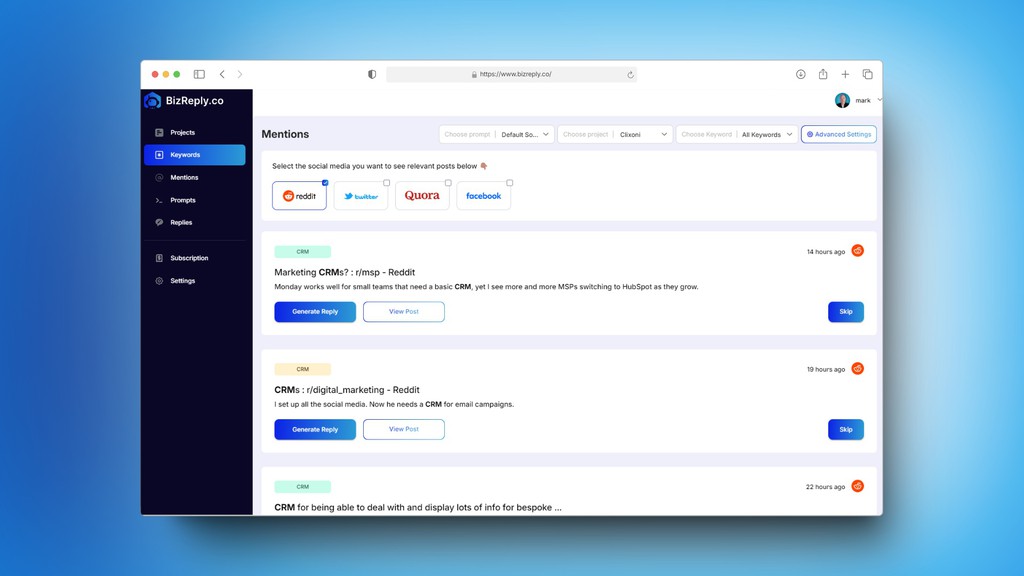
BizReply is a social mentions monitoring and engagement tool. It finds ideal posts on social media using chosen keywords and helps write AI replies that include your brand. This service integrates with popular platforms like Reddit, X, Facebook, LinkedIn, and Quora. Custom prompts can generate personalized replies, increasing efficiency in social media management.
Purpose And Target Audience
The main purpose of BizReply is to save time and boost brand visibility. It provides one-click auto search for new content across multiple platforms. This tool enhances social media management by offering timely and relevant replies.
| Plan | Monthly Cost | Keywords Track | AI Replies/Month | Mentions | Brand Projects | Team Members | History Storage | Custom Prompts |
|---|---|---|---|---|---|---|---|---|
| Solopreneur Plan | $59 | 5 | 200 | 50,000 | 1 | 1 (Coming) | 1 Year | Yes |
| Startup Plan | $99 | 25 | 500 | 150,000 | 5 | 3 (Coming) | 2 Years | Yes |
| Agency Plan | $249 | 25 | Unlimited | 450,000 | 20 | 10 (Coming) | 2 Years | Yes |
BizReply is suited for industries like SaaS, affiliate marketing, marketing agencies, e-commerce, and customer support. These sectors benefit from customizable AI replies and efficient social media management.
For more details, visit the BizReply website.
Credit: m.facebook.com
Key Features Of Bizreply
Bizreply offers a suite of features designed to streamline social media engagement and enhance brand visibility. By leveraging AI, Bizreply ensures timely, relevant replies across various platforms. Let’s explore the key features that make Bizreply a powerful tool for businesses.
Automated Response System
The Automated Response System in Bizreply uses AI to generate replies. These replies are tailored to specific posts, ensuring relevance and engagement. This feature saves time by automating the response process, allowing businesses to focus on strategy.
Multi-channel Integration
Bizreply integrates with popular social media platforms including Reddit, X, Facebook, LinkedIn, and Quora. This multi-channel integration allows businesses to manage their social media presence from a single tool. It ensures a unified approach to social media engagement.
Advanced Analytics And Reporting
Bizreply provides Advanced Analytics and Reporting to track social media performance. Users can monitor up to 450,000 mentions across platforms. This feature helps businesses understand their audience better and refine their strategies based on data-driven insights.
Customizable Templates
With Customizable Templates, Bizreply allows users to create personalized replies. Custom prompts can be set to suit specific needs. This ensures that the responses are consistent with the brand voice and resonate well with the audience.
Ai-driven Customer Insights
Bizreply leverages AI to provide Customer Insights. It analyzes social media interactions to give businesses a deeper understanding of their audience. These insights help in crafting better engagement strategies and improving customer satisfaction.
| Pricing Plan | Monthly Cost | Keywords Track | AI Replies/Month | Mentions | Brand Projects | Team Members | History Storage |
|---|---|---|---|---|---|---|---|
| Solopreneur Plan | $59 | 5 | 200 | 50,000 | 1 | 1 | 1 Year |
| Startup Plan | $99 | 25 | 500 | 150,000 | 5 | 3 | 2 Years |
| Agency Plan | $249 | 25 | Unlimited | 450,000 | 20 | 10 | 2 Years |
Bizreply also offers Pay-As-You-Go Credits for additional mentions and PDF pages. This flexibility ensures that businesses can choose a plan that best suits their needs and scale as required.
For support, Bizreply provides priority support through live chat and email. Users can also contact them via phone or email for any assistance.
Overall, Bizreply’s features cater to various industries, making it a versatile tool for enhancing social media management and engagement.
Pricing And Affordability
BizReply offers competitive pricing plans designed to suit different needs. Whether you are a solopreneur or managing an agency, BizReply’s pricing tiers provide value for money. Let’s delve into the specifics of their pricing and affordability.
Pricing Tiers And Plans
| Plan | Price | Features |
|---|---|---|
| Solopreneur Plan | $59/month |
|
| Startup Plan | $99/month |
|
| Agency Plan | $249/month |
|
| Pay-As-You-Go Credits |
|
Free Trial And Money-back Guarantee
BizReply offers a 30-day money-back guarantee on lifetime-deals. This gives users the confidence to try out the service without financial risk. Although a free trial isn’t explicitly mentioned, the money-back guarantee ensures satisfaction.
Comparative Value Against Competitors
BizReply’s pricing is competitive compared to other social media engagement tools. The Solopreneur Plan at $59/month offers essential features for small businesses. For larger needs, the Startup Plan at $99/month and the Agency Plan at $249/month provide extensive capabilities.
In terms of features, BizReply’s integration with multiple platforms and customizable AI replies make it a strong contender. The ability to track up to 450,000 mentions and create unlimited replies is a significant advantage for agencies.
For those needing flexibility, the pay-as-you-go credits offer an affordable option for managing mentions and generating PDF reports.

Credit: www.youtube.com
Pros And Cons Of Bizreply
In this section, we will explore the advantages and potential drawbacks of using Bizreply. This AI-powered tool is designed to monitor social mentions and help brands engage more effectively. Understanding both the strengths and weaknesses can help you make an informed decision.
Advantages Of Using Bizreply
- AI Social Post Finder & Replier: Automatically finds and responds to posts that match your keywords.
- Integration with Popular Platforms: Works with Reddit, X, Facebook, LinkedIn, and Quora.
- Customized Replies: AI-generated replies tailored to specific posts with custom prompts.
- Keyword-Based Filters: Helps find relevant content quickly.
- Multi-Language Support: Useful for global brands.
- API Key Integration: Use your own API key for added flexibility.
- Saves Time: One-click auto search across multiple platforms.
- Enhances Engagement: Increases brand visibility through timely replies.
- Tracks Mentions: Can track up to 450,000 mentions across platforms.
- Suitable for Various Industries: Ideal for SaaS, affiliate marketing, e-commerce, and more.
Potential Drawbacks And Limitations
- Cost: Plans start at $59 per month, which might be high for small businesses.
- Limited Keywords: The Solopreneur plan allows tracking only 5 keywords.
- Team Member Limitation: Lower plans have a limited number of team members (coming feature).
- Pay-As-You-Go Credits: Additional charges for more mentions and PDF pages.
- Learning Curve: Users may need time to familiarize themselves with the tool.
- Custom Prompts Setup: Requires setup time for personalized AI replies.
Bizreply offers a range of features and benefits that can significantly enhance social media engagement. Understanding its pros and cons will help you determine if it fits your brand’s needs.
Ideal Users And Scenarios
BizReply is an invaluable tool for various users and scenarios. It finds and engages with social media posts that mention your brand. Let’s explore which industries benefit the most from BizReply and the scenarios where it excels.
Best Industries For Bizreply
BizReply suits a variety of industries. Here are the top sectors where it shines:
- SaaS Companies: Track and respond to user feedback across multiple platforms.
- Affiliate Marketing: Engage with posts to promote affiliate products and increase visibility.
- Marketing Agencies: Manage clients’ social media presence efficiently.
- E-commerce: Address customer queries and enhance brand engagement.
- Customer Support: Provide timely support by tracking and responding to mentions.
Scenarios Where Bizreply Excels
BizReply performs exceptionally well in various scenarios, making it a versatile tool. Here are some key scenarios:
- Real-Time Engagement: Automatically find and reply to posts with AI-generated responses, increasing brand visibility.
- Multi-Platform Monitoring: Track mentions across Reddit, X, Facebook, LinkedIn, and Quora with ease.
- Custom Prompts: Generate personalized replies that match your brand voice.
- Multi-Language Support: Engage with users in their preferred language.
- Efficiency: Save time with keyword-based filters and one-click auto search functions.
BizReply also offers various pricing plans to suit different needs. Here is a quick overview:
| Plan | Price | Keywords Track | AI Replies/Month | Mentions | Brand Projects |
|---|---|---|---|---|---|
| Solopreneur | $59/month | 5 | 200 | 50,000 | 1 |
| Startup | $99/month | 25 | 500 | 150,000 | 5 |
| Agency | $249/month | 25 | Unlimited | 450,000 | 20 |
Each plan includes features such as custom prompts and history storage. Choose the plan that fits your needs best.
Credit: appsumo.com
Frequently Asked Questions
What Is Bizreply?
Bizreply is a customer service platform that automates responses. It helps businesses manage customer interactions efficiently.
How Does Bizreply Work?
Bizreply uses AI to automate customer responses. It integrates with various communication channels for seamless interaction.
Is Bizreply Easy To Use?
Yes, Bizreply is user-friendly. It has an intuitive interface that simplifies customer service management.
Can Bizreply Integrate With Other Tools?
Yes, Bizreply integrates with various tools. It supports CRM, email, and social media platforms.
Conclusion
Bizreply offers a robust solution for social media engagement. It saves time and boosts brand visibility with AI-generated replies. Ideal for various industries, it tracks up to 450,000 mentions. Customizable plans cater to different business needs. Discover how Bizreply can enhance your social media strategy. Click to learn more: Bizreply.
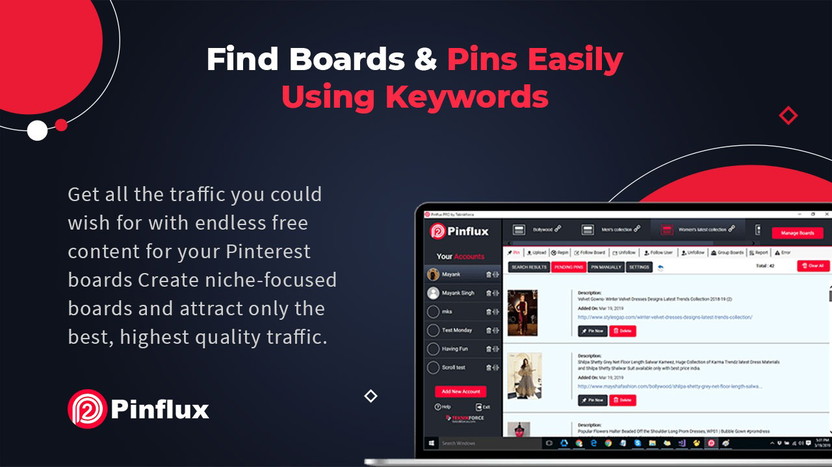
]]>Pinterest automation tools can save you time and increase your productivity. These tools help schedule pins, analyze performance, and boost your Pinterest strategy. With the right tool, you can focus on creating great content while the automation handles the rest.
In this post, we’ll explore the six best Pinterest automation tools. These tools can streamline your Pinterest efforts and help you achieve better results. Ready to make Pinterest management easier? Let’s dive in and discover the top tools that can transform your Pinterest strategy.
Credit: appsumo.com
How to Choose the Right Pinterest Tool for You
Now that we’ve looked at the 7 best Pinterest tools in 2025, it’s important to know how to choose the right one for your needs. Here are a few tips to help you decide:
Functionality: Think about the features you need. For example, if you want to automate your Pinterest posts, Tailwind or Buffer are ideal. If you need to track performance, Pinterest Analytics and Pin Inspector will give you the insights you need.
Consider Your Goals: What do you want to achieve with Pinterest? If your goal is to create beautiful designs, tools like Content Goblin, PinClicks, and Post Planner will help. If you’re looking to track performance and optimize your strategy, tools like Tailwind, Pinterest Analytics, and Pin Inspector are a better fit.
Ease of Use: Some tools are more user-friendly than others. If you’re just getting started with Pinterest, it’s best to choose a tool that’s easy to learn, like Content Goblin or PinClicks.
Budget: Many tools offer both free and paid versions. Consider what you can afford, and choose a tool that fits your budget. Tools like Tailwind, Tailwind, and Post planner have great free plans, but you may need the paid version for advanced features.
Benefits Of Using Automation Tools
Using Pinterest automation tools offers several benefits:
- Audience Growth: Regular posting attracts more followers. Automation tools ensure your content reaches a wider audience.
- Increase Engagement: Scheduled pins keep your audience engaged. Engaged followers interact more with your content.
- Social Media Automation: These tools can manage multiple social media accounts. This means you can integrate your Pinterest strategy with other platforms.
- Better Content Management: Automation tools help organize your pins. This makes it easier to find and share content.
- Analytics and Insights: Detailed analytics help understand your audience better. You can adjust your strategy based on these insights.
- Scheduling Pins: Automation tools allow you to schedule pins for optimal times. This ensures your pins get maximum visibility.
These benefits make automation tools a must-have for anyone serious about Pinterest marketing. They simplify the process and enhance your overall strategy.
Credit: newsroom.pinterest.com
Key Features To Look For
Introduction paragraph about 7 Best Pinterest Automation Tool and Key Features to Look For…
Scheduling Pins
Effective Pin Management Tools should offer robust scheduling capabilities. This feature allows users to plan and post content at optimal times. A good scheduling tool helps in maintaining a consistent posting schedule, which is crucial for Pinterest Growth Strategies.
Look for tools that offer:
- Bulk Uploads: Upload and schedule multiple pins at once, saving time.
- Calendar View: Visualize your content schedule for better planning.
- Time Zone Adjustments: Schedule pins according to different time zones.
- Queue Management: Easily rearrange and manage queued content.
A table comparing top scheduling features can be useful:
| Feature | Tool A | Tool B | Tool C |
|---|---|---|---|
| Bulk Uploads | Yes | No | Yes |
| Calendar View | Yes | Yes | No |
| Time Zone Adjustments | No | Yes | Yes |
| Queue Management | Yes | Yes | No |
Using a tool with these features can enhance your Visual Content Strategy and streamline Social Media Scheduling efforts. This ensures your pins reach the audience at the right time, leading to better engagement and growth.
Analytics And Reporting
An essential feature of any Social Media Automation tool is comprehensive analytics and reporting. Understanding how your pins perform helps in refining your Pinterest Marketing efforts. Good analytics provide insights into what works and what doesn’t.
Key analytics features to look for:
- Engagement Tracking: Monitor likes, shares, and comments on your pins.
- Follower Growth: Track the increase or decrease in followers over time.
- Traffic Sources: Identify where your traffic is coming from.
- Top Performing Pins: See which pins are driving the most engagement.
Here’s a comparison table for analytics features:
| Feature | Tool A | Tool B | Tool C |
|---|---|---|---|
| Engagement Tracking | Yes | Yes | No |
| Follower Growth | Yes | No | Yes |
| Traffic Sources | No | Yes | Yes |
| Top Performing Pins | Yes | Yes | No |
Utilizing Pinterest Analytics within your tool can significantly enhance your Digital Marketing Tools arsenal. It helps refine your Content Scheduling and Visual Content Strategy, leading to a more effective Pinterest Marketing approach.
1. Content Goblin
If you are creating blog posts or listicles for Pinterest, Content Goblin is the tool for you. It helps you generate well-formatted articles with relevant images in just seconds. This tool is perfect for bloggers or businesses that need to produce high-quality Pinterest content quickly.
Key Features:
- Listicle Creator: Generate complete listicle-style articles with text and images.
- Smart Image Pairing: Automatically matches images with your content.
- WordPress Integration: Export your content directly to WordPress, saving time.
Why Content Goblin?
Creating Pinterest content takes time, especially when writing articles and finding matching images. Content Goblin simplifies this process, letting you focus on strategy rather than manual tasks. With plans starting at $29/month, it is a cost-effective way to scale your Pinterest content.
Tool #2: Pin Inspector
-
Pin Inspector is an advanced Pinterest tool that helps you analyze your pins’ performance and discover which types of content are most successful. If you want to improve your Pinterest strategy, this tool is a must-have.
Key Features:
- Performance Tracking: Pin Inspector allows you to track individual pin performance, so you can see which pins are driving the most traffic.
- Keyword Search: It helps you discover trending keywords and tags on Pinterest, allowing you to optimize your pins.
- Competitor Research: You can also analyze your competitors’ pins and boards to find what is working for them.
Why Pin Inspector?
This tool is perfect for marketers who want to dive deep into analytics and discover hidden opportunities. With its detailed performance tracking and keyword research features, Pin Inspector makes it easier to refine your Pinterest marketing strategy
Tool#3:PinClicks
PinClicks is a data-driven tool designed to help you grow your Pinterest account. It offers insights into trending topics, high-performing keywords, and user engagement, allowing you to refine your strategy.
Key Features:
- Keyword Research: Discover keywords that will boost your pins’ visibility.
- Interest Explorer: Explore trending topics to create relevant content.
- Performance Tracking: Analyze your pins and learn what works best.
Why PinClicks?
PinClicks is ideal for marketers focused on data and analytics. Its advanced insights make it easier to create successful Pinterest campaigns. The tool starts at $29/month and offers premium.
Tool #4: Tailwind
Main Features
Tailwind stands out as a leading Pinterest Automation tool due to its robust features. It helps streamline your Pinterest marketing efforts and improve user engagement.
Key features include:
- Automated Pinning: Schedule pins in advance, ensuring consistent activity.
- SmartLoop: Recycle your best content effortlessly, keeping your board active.
- Tailwind Tribes: Collaborate with other pinners to expand your reach.
- Analytics For Pinterest: Gain insights into your performance, helping refine your strategy.
- Hashtag Finder: Discover trending hashtags to optimize your posts.
- Bulk Uploads: Save time by uploading multiple pins at once.
- Board Lists: Organize your boards efficiently for easy scheduling.
These features make Tailwind a powerful tool for social media scheduling and Pinterest growth tools. It’s designed to enhance your visual content strategy and streamline your pin scheduling software needs.
Pricing Options
Tailwind offers flexible pricing options to suit different needs. Here’s a breakdown:
| Plan | Features | Price |
|---|---|---|
| Free Trial | 100 scheduled pins | $0 |
| Pro Plan | 1 Pinterest profile, 400 scheduled pins/month, basic analytics | $9.99/month |
| Advanced Plan | 2 Pinterest profiles, unlimited scheduling, advanced analytics | $19.99/month |
| Max Plan | 5 Pinterest profiles, unlimited scheduling, premium analytics, priority support | $39.99/month |
The free trial allows users to test the waters with 100 scheduled pins. The Pro Plan is ideal for individual users, while the Advanced and Max plans cater to larger teams with more comprehensive needs.
Tailwind’s pricing is competitive among content marketing tools, making it accessible for various budgets. Choose the plan that best fits your Pinterest marketing strategy and start leveraging the power of Pinterest automation.
Why Tailwind?
Tailwind is easy to use and saves a lot of time. Whether you are a beginner or experienced marketer, you will find this tool very useful. It also has a Chrome extension that makes pinning directly from websites very easy.
Tool #5:Tasty Pins
Tasty Pins is a WordPress plugin designed to optimize your blog images for Pinterest. It allows you to add keyword-rich descriptions and hide certain images from your posts until users choose to pin them.
Key Features:
- SEO-Friendly Descriptions: Add Pinterest descriptions directly in WordPress.
- Hidden Pins: Keep your site clean by hiding images that are only for pinning.
- User-Friendly: No coding required, making it simple for beginners.
Why Tasty Pins?
If you want to improve your Pinterest SEO and keep your website clutter-free, Tasty Pins is the perfect solution. For $49/year, it helps you save time and boosts your visibility on Pinterest.
Tool#6:Pin Generator
Pin Generator is an innovative tool for creating pins quickly and easily. This tool automates the design process and includes AI-powered features to make your Pinterest posts stand out.
Key Features:
- Automated Design: Generate pins from website images or templates in seconds.
- AI Writing: Use AI to craft catchy titles and descriptions for your pins.
- Multi-Board Pinning: Share pins across multiple boards with one click.
Why Pin Generator?
If you’re managing a lot of boards or need to create pins in bulk, Pin Generator is the tool for you. Its AI and automation features make it a time-saver for busy marketers
Tool#7:Post Planner
Post Planner is an all-in-one social media scheduling tool that simplifies content management across multiple platforms, including Pinterest. It allows you to plan, organize, and recycle your content effortlessly.
Key Features:
- Bulk Scheduling: Upload and schedule multiple posts at once, saving time.
- Content Categories: Organize your posts into themes for better management.
- Top-Performing Posts: Automatically reshare content that has performed well.
Why Post Planner?
For marketers or small businesses juggling multiple platforms, Post Planner is a lifesaver. Its scheduling and content organization features are perfect for keeping your Pinterest feed consistent. Plans start as low as $7/month, making it affordable for any budget.
How to Use These Tools Effectively
To get the most out of these tools, follow these steps:
- Combine Tools for Different Tasks: Use Content Goblin or PinClicks to create pins, Tailwind or Buffer to schedule them, and Pinterest Analytics or Pin Inspector to track performance.
- Be Consistent: Schedule your pins to go live at regular intervals to maintain an active presence.
- Analyze Performance: Use analytics tools to identify what works and adjust your strategy accordingly.
- Optimize Your Pins: Add keyword-rich descriptions and high-quality visuals to increase your reach.
- Stay Updated: Trends on Pinterest change frequently. Use tools like PinClicks to stay ahead of what’s trending.
Combining Tools for Maximum Efficiency
Each tool on this list serves a specific purpose, and combining them can help you build a strong Pinterest presence. Here’s a quick guide to pairing these tools:
- For Design: Use Content Goblin, pinclicks, or Pin Generator to create eye-catching pins.
- For Scheduling: Use Tailwind, Buffer, or Post Planner to automate your posts.
- For Analytics: Use Pinterest Analytics, Pin Inspector, or PinClicks to track your performance.
- For SEO: Use Tasty Pins to optimize your images for Pinterest searches.
By using a mix of these tools, you can save time, improve your content, and grow your audience effectively.
FAQs
1. Which is the best tool for scheduling Pinterest posts?
Tailwind is the most popular tool for scheduling Pinterest posts. It automates the posting process, suggests the best times to post, and offers analytics to track your performance.
2. Are there free Pinterest tools I can use?
Yes, Pinterest Analytics and Post Planner offer free features. Pinterest Analytics helps track performance, while Post Planner provides basic scheduling and analytics without any cost.
3. How do I create professional-looking pins?
Tools like Content Goblin and Pin Generator are perfect for creating visually appealing pins. They come with pre-designed templates and drag-and-drop editors, making it easy even for beginners.
4. How can I track my Pinterest performance?
Use Pinterest Analytics, Pin Inspector, or PinClicks to track impressions, clicks, and engagement. These tools provide detailed insights to help you improve your strategy.
5. Can I use Pinterest tools without technical knowledge?
Absolutely! Most Pinterest tools, like Tailwind, Tasty Pins, and Content Goblin, are user-friendly and require no technical expertise. They are designed to make Pinterest marketing easy for everyone.
6. What is the best tool for Pinterest SEO?
Tasty Pins is an excellent tool for Pinterest SEO. It helps you add keyword-rich descriptions to your images directly in WordPress, increasing their visibility on Pinterest.
7. Are these tools worth the investment?
Yes, investing in tools like Content Goblin or PinClicks can save time and significantly improve your results. Many tools also offer free trials, so you can test them before committing to a paid plan.
Conclusion
Pinterest continues to be a powerful platform for marketers, creators, and businesses in 2025. With the right tools, you can streamline your workflow, boost your engagement, and grow your audience effectively. From scheduling and analytics to design and SEO, these 7 Pinterest tools cover every aspect of your Pinterest strategy.
Whether you’re a beginner or a seasoned marketer, using tools like Content Goblin, Pin Inspector, PinClicks, and Content Goblin can make a significant difference in your results. Combining their features will save you time and give your content the professional edge it needs to stand out.
Experiment with these tools and find the combination that works best for you. Remember, consistency and creativity are key to Pinterest success. With these tools in your arsenal, you’re well-equipped to maximize your Pinterest potential.
]]>This automated tool promises to generate listicles with high-quality images in seconds. Content Goblin offers impressive automation features. Enter your topic, and it creates a full listicle almost instantly. You can customize subheadings using an outline builder, and automatically post drafts to WordPress. The tool also generates images seamlessly, saving you hours. This efficiency eliminates the need for multiple AI tools or expensive virtual assistants. Want to explore more about how Content Goblin can enhance your content creation process? Check out Content Goblin for detailed information and pricing plans. Let’s dive into this review and see if it’s the right fit for your needs.
Introduction To Contentgoblin
Content Goblin is a powerful tool that automates the creation of listicles with high-quality images in a matter of seconds. This tool aims to streamline the content creation process, making it easier and faster to generate engaging content for your website.
What Is Contentgoblin?
Content Goblin is an automated content generation tool. It allows users to create listicles, complete with high-quality images, almost instantly. This tool simplifies the workflow for website content creation, helping users save both time and money.
Purpose And Overview
The main purpose of Content Goblin is to automate and simplify content creation. Here are some key features and benefits:
- Automation: Enter a topic and receive a complete listicle almost instantly.
- Customization: Customize subheadings with an outline builder.
- Integration: Automatically post drafts to WordPress and other platforms.
- Image Generation: Choose image quality and generate images seamlessly.
- Efficiency: Save hours with automation, eliminating the need for multiple AI tools or expensive virtual assistants.
Content Goblin is designed to be cost-efficient and time-saving. It helps users generate complete articles and sections with just a few clicks. This tool is suitable for businesses of all sizes, offering different plan options to meet various needs.
| Plan | Price | Features |
|---|---|---|
| Ghoul Plan | $29/month |
|
| Ghost Plan | $49/month |
|
| Goblin Plan | $99/month |
|
Refund Policy: No refunds are available for used credits due to costs.
For support, you can contact John, the developer, directly. Users can also provide feedback via the support email: hello@contentgoblin.ai.
Key Features Of Contentgoblin
Content Goblin offers a range of key features designed to streamline your content creation process. These features make it an indispensable tool for anyone looking to enhance their website’s content efficiently. Below, we delve into the core functionalities that set Contentgoblin apart.
Content Goblin excels at automated content creation. Simply enter a topic, and the tool will generate a complete listicle in seconds. This feature saves you hours of writing and research. It also includes high-quality images, making your content visually appealing.
Content optimization is crucial for better search engine rankings. Content Goblin provides tools to optimize your content seamlessly. You can customize subheadings using the outline builder. This ensures your content is well-structured and easy to read.
Multi-platform publishing is made easy with Content Goblin. The tool allows you to automatically post drafts to WordPress and other platforms. This eliminates the need for manual uploading, saving you time and effort.
Understanding how your content performs is vital. Content Goblin includes analytics and performance tracking features. These tools help you monitor your content’s performance, enabling you to make data-driven decisions.
Customizable templates are a standout feature. Content Goblin offers a variety of templates that you can customize to fit your needs. This allows you to maintain a consistent look and feel across your content, enhancing your brand’s identity.
| Feature | Description |
|---|---|
| Automated Content Creation | Generate listicles with images in seconds |
| Content Optimization Tools | Optimize and customize subheadings |
| Multi-Platform Publishing | Automatically post drafts to various platforms |
| Analytics and Performance Tracking | Monitor content performance |
| Customizable Templates | Customizable templates for consistent branding |
These key features make Content Goblin a powerful tool for content creators. By leveraging these functionalities, you can enhance your workflow, save time, and produce high-quality content effortlessly.
Automated Content Creation
Content Goblin is a tool designed to automate the content creation process. It generates listicles with high-quality images in seconds. This saves time and enhances productivity for content creators.
How It Works
Content Goblin operates on a simple principle: automation. Users enter a topic, and the tool generates a full listicle almost instantly. This includes images of varying quality based on user preferences. The platform also offers customization of subheadings using an outline builder.
| Main Features | Description |
|---|---|
| Automation | Enter a topic and get a full listicle almost instantly. |
| Customization | Customize subheadings using an outline builder. |
| Integration | Automatically post drafts to WordPress and other platforms. |
| Image Generation | Choose image quality and generate images seamlessly. |
| Efficiency | Save hours with automation, eliminating the need for multiple AI tools or expensive virtual assistants. |
Benefits For Content Creators
Content Goblin offers many benefits for content creators. It provides time-saving solutions, cost-efficiency, and a streamlined workflow. Here are some key benefits:
- Time-Saving: Generate complete articles and sections with just a few clicks.
- Cost-Efficient: Reduce the need for freelancers or virtual assistants.
- Streamlined Workflow: Handle both content and image creation on a single platform.
- Easy Publishing: Post drafts directly to WordPress with no manual effort.
- Scalability: Suitable for businesses of all sizes with different plan options.
Time-saving Advantages
One of the main advantages of Content Goblin is its ability to save time. Here are some ways it achieves this:
- Instant Content Generation: Enter a topic and receive a complete listicle almost instantly.
- Integrated Image Generation: Generate images seamlessly without switching platforms.
- Direct Publishing: Post drafts to WordPress with a few clicks, eliminating manual uploads.
- Automatic Customization: Use the outline builder to customize subheadings quickly.
Content Goblin simplifies the content creation process, allowing creators to focus on other important tasks.
How to use Contentgoblin tools
Content Optimization Tools
Content Goblin offers a suite of content optimization tools that streamline the process of content creation. These tools ensure your content is SEO-friendly, readable, and well-integrated with relevant keywords.
Seo Optimization
Content Goblin simplifies SEO optimization by automatically incorporating best practices. It generates listicles with high-quality images and ensures your content ranks well on search engines.
- Automated keyword suggestions
- Meta tag generation
- SEO-friendly URLs
Readability Enhancements
Enhancing readability is crucial. Content Goblin provides tools to ensure your content is easy to understand. The platform uses an outline builder to help you customize subheadings and create well-structured articles.
- Simple sentence structures
- Short paragraphs
- Clear and concise language
Keyword Integration
Content Goblin’s keyword integration tool helps you seamlessly incorporate relevant keywords. This improves your content’s visibility and engagement.
| Feature | Description |
|---|---|
| Automated Keyword Suggestions | Suggests relevant keywords based on the topic |
| Keyword Density Checker | Ensures optimal keyword usage |
| Synonym Integration | Integrates synonyms to avoid keyword stuffing |
These tools make Content Goblin a valuable asset for anyone looking to optimize their content creation process.
Multi-platform Publishing
Content Goblin is designed to simplify content creation across multiple platforms. This tool ensures seamless integration and distribution, making it easier for users to manage their content strategy.
Supported Platforms
Content Goblin supports a variety of platforms, ensuring users can publish their content wherever they need. The tool directly integrates with:
- WordPress
- Other CMS platforms
This flexibility makes it an essential tool for anyone needing to manage content across different channels.
Streamlining Content Distribution
Content Goblin streamlines the distribution process, saving users significant time and effort. With automated posting, users can:
- Generate and publish listicles with high-quality images
- Automate drafts to WordPress
- Eliminate the need for multiple AI tools
This automation simplifies the workflow and ensures consistent posting schedules, enhancing overall efficiency.
Cross-platform Consistency
Maintaining consistency across multiple platforms can be challenging. Content Goblin addresses this by ensuring:
- Uniform content style and quality
- Seamless image integration
- Consistent publishing schedules
With these features, Content Goblin helps users maintain a cohesive brand presence across all their platforms.

Credit: www.audacy.com
Analytics And Performance Tracking
Understanding how your content performs is key to improving it. Content Goblin offers robust analytics and performance tracking features. These tools help you make data-driven decisions.
Real-time Data Insights
With Content Goblin, you get real-time data insights. This means you can track your content’s performance as soon as it’s published. The platform provides metrics on views, clicks, and shares. This helps you gauge your content’s immediate impact.
Real-time insights allow for quick adjustments. If a post isn’t performing well, you can tweak it. This flexibility is crucial for staying relevant and engaging your audience effectively.
Improving Content Strategy
Content Goblin helps you refine your content strategy. The platform shows which topics and formats work best. You can see detailed reports on your most successful posts. Use this data to create more of what your audience loves.
By understanding what works, you can focus your efforts. This means less time on guesswork and more on producing high-quality content. It’s a smart way to enhance your strategy and boost your reach.
Tracking Engagement And Reach
Engagement and reach are vital metrics. Content Goblin tracks these for you. You can see how many people interact with your content. This includes likes, comments, and shares. Knowing your engagement levels helps you understand your audience better.
Reach metrics show how far your content spreads. This is important for measuring your content’s impact. High reach means more people see your content, potentially leading to more followers and customers.
In summary, Content Goblin provides comprehensive analytics and performance tracking. These features help you improve your content strategy and maximize your reach.
Customizable Templates
Content Goblin offers a range of customizable templates, making content creation smoother and more efficient. These templates allow users to quickly generate high-quality listicles and images, ensuring a streamlined workflow for website content creation.
Design Flexibility
Content Goblin’s templates provide exceptional design flexibility. Users can adjust subheadings and other elements using an outline builder. This feature ensures each piece of content meets specific design needs without much hassle.
The platform offers a variety of templates for different niches, making it easy to find the perfect match for your content.
Brand Consistency
Maintaining brand consistency is crucial. Content Goblin’s templates help in preserving your brand’s voice and style. Users can customize templates to align with their brand guidelines, ensuring that every piece of content looks and feels consistent.
This capability is especially beneficial for businesses looking to maintain a uniform online presence across all platforms.
Ease Of Use
Using Content Goblin’s templates is straightforward and user-friendly. The platform is designed to be intuitive, allowing users to create content with ease. Even those with limited technical skills can navigate and utilize the templates effectively.
With just a few clicks, you can generate complete articles and images, saving both time and effort. This ease of use makes Content Goblin an excellent tool for businesses of all sizes.
| Plan | Price | Features |
|---|---|---|
| Ghoul Plan | $29/month |
|
| Ghost Plan | $49/month |
|
| Goblin Plan | $99/month |
|
For more information, visit Content Goblin.
Pricing And Affordability
Content Goblin offers a range of pricing plans to meet different needs and budgets. Whether you’re a small business or a large enterprise, there is a plan that fits your requirements.
Subscription Plans
| Plan | Price | Features |
|---|---|---|
| Ghoul Plan | $29/month |
|
| Ghost Plan | $49/month |
|
| Goblin Plan | $99/month |
|
Cost-benefit Analysis
The Ghoul Plan is ideal for small businesses. It offers essential features at a low price. You get 2900 credits per month and access to all future features. This plan is suitable for those just starting.
The Ghost Plan provides more credits and better value. It is priced at $49/month. It offers 6000 credits per month. This plan is great for medium-sized businesses. It includes all the features of the Ghoul Plan, plus higher image quality options.
The Goblin Plan is the top-tier option. It is priced at $99/month. You get 14000 credits per month. This plan is perfect for large enterprises. It offers the highest image quality and the most credits.
Free Vs. Paid Features
Content Goblin does not offer a free plan. The paid plans come with varying credits and features. The Ghoul Plan is the most affordable option at $29/month. It includes basic features like image listicle generation and posting drafts to WordPress.
The Ghost Plan and Goblin Plan offer more credits and higher image quality. These plans also provide access to all future features. Users can choose the plan that best suits their needs and budget.
Pros And Cons Of Contentgoblin
Content Goblin offers a unique solution for creating listicles with high-quality images quickly. It simplifies the content creation process for various users. Below, we explore the advantages and potential drawbacks of using Content Goblin based on real-world usage.
Advantages Based On Real-world Usage
Content Goblin has several advantages that make it a valuable tool:
- Automation: Enter a topic and get a full listicle almost instantly.
- Customization: Use the outline builder to customize subheadings.
- Integration: Automatically post drafts to WordPress and other platforms.
- Image Generation: Choose image quality and generate images seamlessly.
- Efficiency: Save hours with automation, eliminating the need for multiple AI tools or expensive virtual assistants.
| Feature | Benefits |
|---|---|
| Time-Saving | Generate complete articles and sections with just a few clicks. |
| Cost-Efficient | Reduce costs by not needing freelancers or virtual assistants. |
| Streamlined Workflow | Handle both content and image creation on a single platform. |
| Easy Publishing | Post drafts directly to WordPress with no manual effort. |
| Scalability | Suitable for businesses of all sizes with different plan options. |
Potential Drawbacks
Despite its many benefits, Content Goblin has some potential drawbacks:
- No Refunds: No refunds are available for used credits due to costs.
- Cost: The monthly plans might be expensive for small businesses or individuals.
- Image Quality Limitation: The number of high-quality images generated is limited by the plan you choose.
Overall, Content Goblin provides a comprehensive solution for content and image automation. Its advantages in automation, customization, and efficiency make it a strong contender in content creation tools. However, potential users should consider the cost and refund policies before committing.

Credit: www.skool.com
Recommendations For Ideal Users
Content Goblin is a versatile tool designed to automate content creation. It is especially useful for specific user groups and scenarios. Below, we outline who will benefit the most and the best use scenarios.
Who Will Benefit The Most?
| User Type | Benefits |
|---|---|
| Bloggers |
|
| Small Businesses |
|
| Content Marketers |
|
| Freelancers |
|
Best Use Scenarios
- Automated Listicle Creation: Users can generate listicles with high-quality images in seconds, perfect for blog posts and website content.
- WordPress Integration: Automatically post drafts to WordPress, simplifying the publishing process.
- Image Generation: Choose image quality and generate images seamlessly, enhancing visual content.
- Customizable Outlines: Use the outline builder to customize subheadings, making content creation more flexible.
- Time-Efficient Content Production: Save hours with automation, eliminating the need for freelancers or virtual assistants.
Content Goblin is a powerful tool for those who need to create content quickly and efficiently. Its wide range of features makes it ideal for various users and scenarios.
Frequently Asked Questions
What Is Contentgoblin?
Contentgoblin is a content management tool. It helps streamline content creation and distribution processes. It aims to enhance productivity.
How Does Contentgoblin Work?
Contentgoblin organizes your content. It allows easy scheduling and publishing. It integrates with various platforms for seamless distribution.
Is Contentgoblin User-friendly?
Yes, Contentgoblin is user-friendly. It has an intuitive interface. It requires minimal technical skills to operate.
Can Contentgoblin Improve Content Strategy?
Yes, Contentgoblin can improve content strategy. It offers analytics and insights. These help refine and optimize your content plans.
Conclusion
Content Goblin offers a complete solution for content creation. It saves time and cuts costs. Its automation and customization features are impressive. Posting drafts directly to WordPress is a plus. Suitable for businesses of any size. Check out Content Goblin for your content needs. Learn more about Content Goblin here.
]]>