
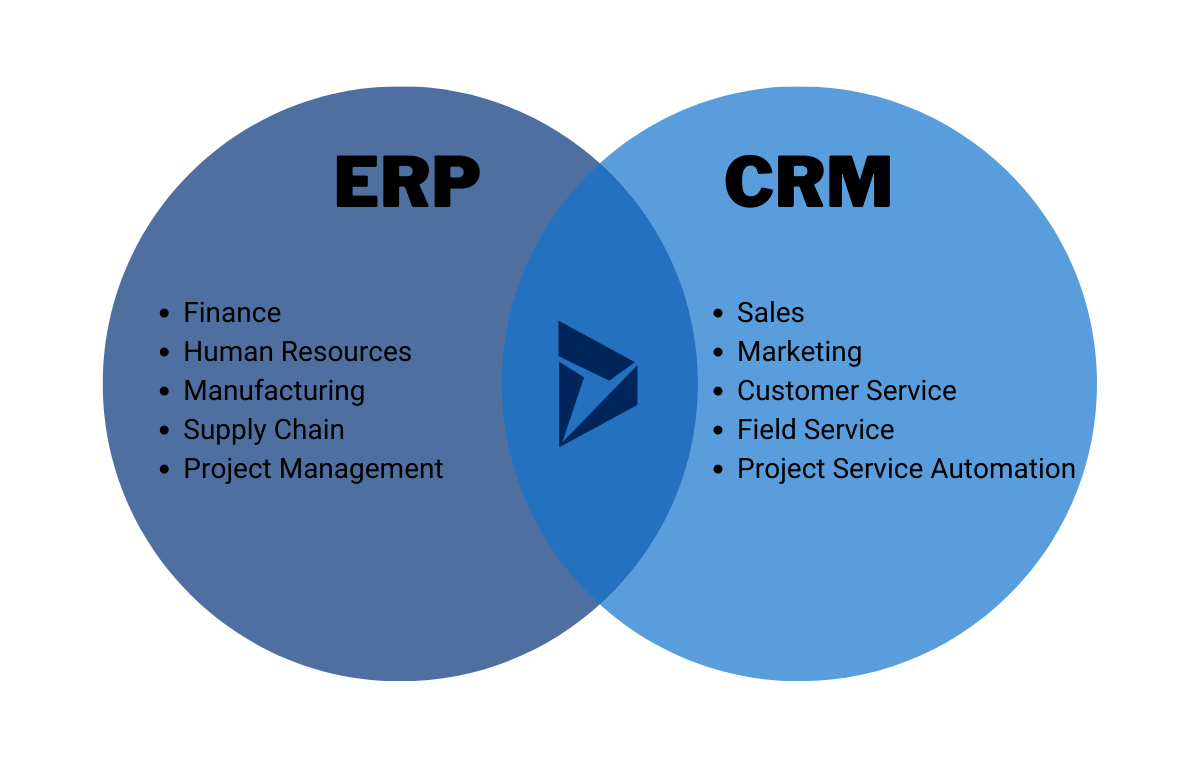
ERP and CRM software serve different business needs. Both are essential but function differently.
ERP, or Enterprise Resource Planning, integrates internal processes. It covers areas like finance, human resources, and supply chain. CRM, or Customer Relationship Management, focuses on external interactions. It manages customer data, sales, and support. Understanding the difference between ERP and CRM helps businesses choose the right tools.
ERP optimizes internal operations, improving efficiency. CRM enhances customer relationships, boosting sales and satisfaction. Knowing their distinct roles can guide strategic decisions. This blog will explore these differences, helping you understand which software suits your business needs. Stay tuned to learn more about how ERP and CRM can transform your operations and customer interactions.
Erp Vs Crm: Key Concepts
Understanding the difference between ERP and CRM software is crucial for businesses. Both are vital Business Management Systems, yet they serve distinct purposes. ERP (Enterprise Resource Planning) focuses on improving Operational Efficiency by integrating various business processes. CRM (Customer Relationship Management) enhances customer interactions and sales. Knowing their key concepts helps in choosing the right solution for your business needs.
Core Functions Of Erp
ERP software is designed to streamline and automate various business processes. It integrates multiple functions into a single system to enhance efficiency and data consistency. Key functions of ERP include:
- Inventory Management: Tracks stock levels, orders, and deliveries.
- Financial Management: Manages accounting, budgeting, and financial reporting.
- Human Resources: Handles employee records, payroll, and recruitment.
- Supply Chain Management: Oversees procurement, production, and distribution.
ERP systems ensure that all departments work with the same data. This Data Integration helps in making informed decisions. For example, an ERP system can automatically update inventory levels after a sale, ensuring accurate stock management.
Here’s a table summarizing the core functions of ERP:
| Function | Description |
|---|---|
| Inventory Management | Tracks stock levels and orders |
| Financial Management | Handles accounting and financial reporting |
| Human Resources | Manages employee records and payroll |
| Supply Chain Management | Oversees procurement and distribution |
Core Functions Of Crm
CRM software focuses on managing a company’s interactions with current and potential customers. It is designed to improve customer relationships and drive sales growth. Key functions of CRM include:
- Customer Data Management: Stores and organizes customer information.
- Sales Automation: Streamlines sales processes and tracks sales activities.
- Marketing Automation: Manages marketing campaigns and tracks their effectiveness.
- Customer Support: Tracks and resolves customer issues and inquiries.
CRM systems help in understanding customer needs and preferences. This leads to improved customer satisfaction and loyalty. For example, CRM software can automate follow-up emails after a sale, ensuring consistent customer engagement.
Here’s a table summarizing the core functions of CRM:
| Function | Description |
|---|---|
| Customer Data Management | Organizes customer information |
| Sales Automation | Tracks and manages sales activities |
| Marketing Automation | Manages marketing campaigns |
| Customer Support | Resolves customer issues |

Credit: www.zendesk.com
Target Users
Understanding the difference between ERP and CRM software is essential for businesses. One key aspect is the target users. Both systems serve different roles and cater to various needs within an organization. Knowing who uses ERP and CRM can help you decide which system is the right fit for your company.
Who Uses Erp?
Enterprise Resource Planning (ERP) software is used by businesses looking to integrate their various functions into a single system. ERP users typically include:
- Manufacturers: They use ERP to manage production schedules, inventory levels, and supply chain logistics.
- Finance Departments: This team uses ERP for accounting, budgeting, and financial reporting.
- Human Resources: HR departments rely on ERP for payroll, employee records, and benefits administration.
- Project Managers: They use ERP to track project timelines, resources, and costs.
- Procurement Teams: These users manage supplier relationships, purchase orders, and inventory replenishment through ERP.
ERP systems are versatile and cater to various industries. Here’s a simple table showcasing ERP users across different sectors:
| Industry | ERP Users |
|---|---|
| Manufacturing | Production Managers, Supply Chain Managers |
| Finance | Accountants, Financial Analysts |
| Healthcare | Hospital Administrators, Inventory Managers |
| Retail | Store Managers, Inventory Controllers |
ERP systems are ideal for large companies with complex processes. They help in streamlining operations and improving efficiency.
Who Uses Crm?
Customer Relationship Management (CRM) software focuses on managing interactions with customers. CRM users typically include:
- Sales Teams: They use CRM to manage leads, track customer interactions, and close deals.
- Marketing Departments: This team uses CRM to run campaigns, track customer engagement, and measure ROI.
- Customer Service Teams: They use CRM to handle customer inquiries, manage support tickets, and improve customer satisfaction.
- Business Owners: Owners use CRM to get insights into sales performance and customer trends.
- Account Managers: These users manage client relationships, renewals, and upselling opportunities through CRM.
CRM systems are particularly useful for businesses that focus on customer interactions and relationships. Below is a table illustrating CRM users across different sectors:
| Industry | CRM Users |
|---|---|
| Retail | Sales Associates, Customer Service Reps |
| Finance | Financial Advisors, Relationship Managers |
| Healthcare | Patient Coordinators, Support Staff |
| Real Estate | Agents, Brokers |
CRM systems help businesses build and maintain strong customer relationships. They are perfect for companies that prioritize customer satisfaction and engagement.
Integration And Data Flow
Understanding the difference between ERP and CRM software is crucial for businesses. One key area is how they handle integration and data flow. Both systems manage data, but their focus and methods differ. Let’s explore how each system manages data.
Data Management In Erp
ERP, or Enterprise Resource Planning, software integrates various business processes. This integration helps in managing data across departments. ERP systems are designed to handle:
- Finance and accounting
- Human resources
- Manufacturing
- Supply chain management
An ERP system creates a centralized database. This database stores all business data. It ensures all departments work with the same information. This centralization helps in:
- Reducing data redundancy
- Improving data accuracy
- Enhancing data security
For example, when a product is sold, the inventory, sales, and finance departments update simultaneously. This seamless data flow improves efficiency and decision-making. Here is a table showing the typical data points managed by an ERP system:
| Department | Data Managed |
|---|---|
| Finance | Revenue, expenses, budgets |
| HR | Employee records, payroll |
| Manufacturing | Production schedules, inventory |
| Supply Chain | Order processing, supplier data |
Data Management In Crm
CRM, or Customer Relationship Management, software focuses on customer data. CRM systems help manage interactions with current and potential customers. They are primarily used by:
- Sales teams
- Marketing departments
- Customer service teams
CRM systems store detailed customer information. This includes:
- Contact details
- Purchase history
- Customer preferences
These systems track every interaction with a customer. This tracking helps in understanding customer behavior and needs. The data flow in CRM systems is designed to:
- Enhance customer satisfaction
- Improve sales strategies
- Optimize marketing campaigns
For instance, if a customer contacts support, the CRM system updates their profile with the interaction details. This ensures all team members have access to the latest customer information. Here is a table showing the typical data points managed by a CRM system:
| Department | Data Managed |
|---|---|
| Sales | Leads, sales opportunities |
| Marketing | Campaign results, customer segments |
| Customer Service | Support tickets, customer feedback |
Both ERP and CRM systems are essential for managing different types of data. Understanding their integration and data flow helps businesses use these tools effectively.
Credit: www.calsoft.com
Customization And Scalability
ERP and CRM software play key roles in business operations. ERP manages internal processes, while CRM focuses on customer relationships. Understanding the difference helps in choosing the right tool. Customization and scalability are essential aspects to consider. These features ensure the software adapts to business needs and grows with the company.
Tailoring Erp Systems
ERP systems integrate various business functions like finance, HR, and supply chain. Customization allows these systems to meet specific business needs. This adaptability is crucial for efficiency. Here are some ways ERP systems can be tailored:
- Module Selection: Businesses can choose specific modules like finance, HR, or inventory management.
- Workflow Customization: Adjust workflows to match unique business processes.
- Reporting and Analytics: Create custom reports and dashboards for better insights.
- Integration: ERP systems can integrate with other software, enhancing functionality.
Scalability in ERP systems is vital as businesses grow. A scalable ERP can handle increased data and users without performance issues. Key features of scalable ERP systems include:
| Feature | Benefit |
|---|---|
| Cloud-Based Solutions | Easy to scale resources as needed. |
| Modular Design | Add or remove modules based on business growth. |
| High Performance | Handle large volumes of data efficiently. |
Tailoring Crm Systems
CRM systems focus on managing customer relationships and interactions. Customizing CRM software helps businesses better serve their customers. Here are some customization options for CRM systems:
- Contact Management: Customize fields to store relevant customer information.
- Sales Process: Tailor the sales pipeline to fit the sales strategy.
- Email Templates: Create custom email templates for various customer interactions.
- Automated Workflows: Set up workflows for tasks like follow-ups and lead scoring.
Scalability is equally important for CRM systems. As the customer base grows, the CRM should handle the increased load. Key features of scalable CRM systems include:
| Feature | Benefit |
|---|---|
| Cloud-Based Solutions | Flexible and scalable storage options. |
| Customizable Dashboards | Adapt dashboards to display crucial metrics. |
| Advanced Analytics | Handle large datasets for better insights. |
Both ERP and CRM systems offer customization and scalability. These features help businesses adapt and grow effectively. Choosing the right system depends on specific business needs and future growth plans.
Cost And Investment
Understanding the cost and investment involved in ERP and CRM software is crucial for businesses. Both types of software offer distinct functionalities, and their costs reflect these differences. Knowing the financial commitment required for each can help in making an informed decision.
Erp Implementation Costs
ERP (Enterprise Resource Planning) software integrates various business processes. This integration comes with significant investment. The costs vary based on the size of the company, the complexity of the processes, and the chosen ERP system. Here are the main factors affecting ERP implementation costs:
- Software License Fees: These are the initial costs for purchasing the ERP software. They can range from a few thousand to several hundred thousand dollars.
- Customization: Tailoring the ERP system to fit specific business needs can be expensive. This includes modifying the software and developing new features.
- Implementation Services: This covers the cost of consultants and specialists needed to install and configure the system. It also includes data migration and system integration.
- Training: Training employees to use the new ERP system is essential. Costs depend on the number of users and the complexity of the system.
- Maintenance and Support: Ongoing costs include updates, technical support, and system maintenance.
To provide a clearer picture, here is a table summarizing the typical ERP implementation costs:
| Cost Component | Estimated Cost Range |
|---|---|
| Software License Fees | $10,000 – $500,000 |
| Customization | $5,000 – $100,000 |
| Implementation Services | $20,000 – $250,000 |
| Training | $1,000 – $50,000 |
| Maintenance and Support | $5,000 – $50,000 annually |
Crm Implementation Costs
CRM (Customer Relationship Management) software focuses on managing customer interactions and improving sales. CRM systems are generally less expensive than ERP systems due to their narrower focus. Here are the key factors influencing CRM implementation costs:
- Subscription Fees: Most CRM software is subscription-based. Costs vary depending on the number of users and the features included.
- Customization: Adjusting the CRM to align with specific business processes may incur additional costs.
- Integration: Integrating CRM with existing systems like email, social media, and other tools can affect costs.
- Training: Ensuring employees are proficient in using the CRM system is vital. Training costs depend on the complexity of the system.
- Maintenance and Support: Ongoing support and updates are necessary to keep the CRM system running smoothly.
Here is a table summarizing the typical CRM implementation costs:
| Cost Component | Estimated Cost Range |
|---|---|
| Subscription Fees | $12 – $100 per user/month |
| Customization | $1,000 – $10,000 |
| Integration | $1,000 – $5,000 |
| Training | $500 – $5,000 |
| Maintenance and Support | $1,000 – $10,000 annually |
Deployment Models
Understanding the difference between ERP and CRM software is crucial for businesses looking to optimize their operations and customer relationships. One important aspect to consider is the deployment model of each system. Deployment models determine how the software is installed and accessed, impacting costs, flexibility, and maintenance. Let’s explore the deployment models of ERP and CRM software.
On-premises Erp
On-premises ERP (Enterprise Resource Planning) systems are installed directly on a company’s servers and computers. This deployment model gives businesses complete control over their software and data. Here are some key points to consider:
- Control and Customization: Companies can tailor the system to their specific needs.
- Security: Data is stored on-site, providing higher security for sensitive information.
- Initial Investment: Higher upfront costs due to hardware, software licenses, and installation.
- Maintenance: Requires IT staff for ongoing maintenance and updates.
- Scalability: Scaling may require additional hardware and resources.
On-premises ERP systems are ideal for businesses that need customized solutions and have the resources to manage and secure their systems. While the initial investment is significant, the long-term control and security benefits can be substantial.
Cloud-based Crm
Cloud-based CRM (Customer Relationship Management) systems are hosted online and accessed through a web browser. This deployment model offers several advantages:
- Accessibility: Accessible from any location with an internet connection.
- Cost-Effective: Lower upfront costs with subscription-based pricing models.
- Maintenance: Vendor handles updates and maintenance, reducing the need for in-house IT staff.
- Scalability: Easily scalable to accommodate business growth without additional hardware.
- Integration: Often integrates seamlessly with other cloud-based applications.
Cloud-based CRM systems are suitable for businesses looking for flexibility and cost savings. The ability to access the system from anywhere and the reduced need for IT maintenance make cloud-based CRM a popular choice for many companies.
User Experience
Understanding the difference between ERP and CRM software is crucial for businesses aiming for operational efficiency. Both systems improve business management but in different ways. The user experience of these systems plays a significant role in how effectively they can be utilized. Let’s delve into the user interface of ERP and CRM systems to understand their unique aspects.
Erp User Interface
ERP systems, or Enterprise Resource Planning software, are designed to manage various business processes. The user interface of ERP systems can be complex due to the vast range of functionalities they offer.
Key Features of ERP User Interface:
- Comprehensive Dashboards: ERP systems provide dashboards that give an overview of key performance indicators (KPIs) and metrics.
- Modular Design: Different modules for finance, HR, supply chain, and more are integrated into one interface.
- Customizable Layouts: Users can often customize their dashboards to show the most relevant data.
- Data Management: Extensive data entry forms and reports are available for detailed data management.
ERP user interfaces are generally more robust and may have a steeper learning curve. They are designed for in-depth business management, requiring users to navigate through various modules and screens. This complexity can be daunting for new users but is necessary for comprehensive operational control.
Example Table:
| Feature | Description |
|---|---|
| Dashboard | Shows KPIs and metrics |
| Modular Design | Includes modules for different business functions |
| Customizable Layout | Personalized views and reports |
| Data Management | Detailed forms and reports |
Crm User Interface
CRM systems, or Customer Relationship Management software, focus on sales automation and managing customer interactions. The user interface of CRM systems is designed to be more user-friendly and intuitive.
Key Features of CRM User Interface:
- Intuitive Dashboards: CRMs offer dashboards that highlight sales pipelines, customer interactions, and performance metrics.
- Simple Navigation: The interface is typically more straightforward, with easy access to customer data and sales tools.
- Sales Automation: Tools for automating sales tasks are prominently featured.
- Customer Insights: Visual representations of customer data and relationships help in understanding customer needs.
CRM user interfaces are designed to be simple and easy to navigate. They focus on enhancing the user experience by providing quick access to customer information and sales tools. This simplicity helps sales teams to be more efficient and effective in their roles.
Example Table:
| Feature | Description |
|---|---|
| Dashboard | Highlights sales pipelines and metrics |
| Simple Navigation | Easy access to customer data |
| Sales Automation | Automates sales tasks |
| Customer Insights | Visual customer data |
Future Trends
Enterprise Resource Planning (ERP) and Customer Relationship Management (CRM) software have distinct roles in business operations. ERP focuses on integrating various business processes, while CRM aims to enhance customer interactions. Let’s explore the future trends in these systems to understand their evolving landscapes.
Innovations In Erp
ERP systems are continuously evolving to meet the dynamic needs of businesses. Here are some key innovations shaping the future of ERP:
- Artificial Intelligence (AI) Integration: AI is enhancing ERP systems by providing predictive analytics and automating routine tasks. This helps in better decision-making and efficiency.
- Cloud-Based Solutions: Cloud ERP is becoming more popular due to its flexibility, scalability, and cost-effectiveness. Businesses can access data from anywhere, making operations more seamless.
- Internet of Things (IoT): IoT integration with ERP allows real-time data collection from various devices. This leads to improved inventory management and operational efficiency.
- Enhanced User Experience: Modern ERP systems focus on user-friendly interfaces. This reduces the learning curve and improves user adoption rates.
| Innovation | Benefits |
|---|---|
| AI Integration | Predictive analytics, task automation |
| Cloud-Based Solutions | Flexibility, scalability, cost savings |
| IoT Integration | Real-time data collection, better inventory management |
| Enhanced User Experience | Improved user adoption, reduced learning curve |
Innovations In Crm
CRM software is also seeing significant advancements. These innovations aim to enhance customer relationships and streamline sales processes:
- AI and Machine Learning (ML): AI and ML are transforming CRM by offering personalized customer experiences. They analyze customer data to predict behavior and preferences.
- Omnichannel Integration: Modern CRMs integrate various communication channels. This provides a unified view of customer interactions, improving customer service.
- Mobile CRM: Mobile-friendly CRM applications allow sales teams to access customer information on the go. This increases productivity and responsiveness.
- Social Media Integration: CRMs now incorporate social media data. This helps in tracking customer sentiments and engaging with them effectively.
| Innovation | Benefits |
|---|---|
| AI and ML | Personalized experiences, behavior prediction |
| Omnichannel Integration | Unified customer view, better service |
| Mobile CRM | Increased productivity, on-the-go access |
| Social Media Integration | Track sentiments, effective engagement |

Credit: www.customerization.ca
Frequently Asked Questions
What Is Erp Software?
ERP software stands for Enterprise Resource Planning. It integrates various business processes into one system. It enhances efficiency by automating operations like inventory, finance, and HR.
What Is Crm Software?
CRM software stands for Customer Relationship Management. It focuses on managing and improving customer interactions. It helps businesses nurture leads, streamline communication, and enhance customer service.
How Does Erp Differ From Crm?
ERP manages internal business processes, while CRM focuses on customer interactions. ERP integrates various departments, and CRM improves sales and customer relationships.
Can Erp And Crm Be Integrated?
Yes, ERP and CRM can be integrated. Integration helps streamline business operations and enhance customer management, improving overall efficiency.
Conclusion
ERP and CRM software serve different business needs. ERP focuses on internal processes. CRM targets customer relationships. Both systems can work together for better efficiency. Understand your business requirements. Choose the right software for your goals. This will lead to smoother operations.
And happier customers. Implementing the right system boosts productivity. It also improves overall growth. So, take the time to explore your options. The right choice can make a big difference.
